How to Set Up Thordata Residential Proxies in VMLogin: Step-by-Step Integration Guide

For users who need isolated browser environments, localized browsing setups, and flexible proxy configuration, combining a browser profile tool with residential proxies is a practical solution.
For teams looking for a simple setup workflow, Thordata rotating residential proxies + VMLogin offer a straightforward integration path. This guide explains how to connect Thordata proxies to VMLogin, including how to generate proxy credentials, choose the right session type, and configure everything inside a browser profile.
Why Use Thordata with VMLogin
VMLogin provides isolated browser profiles and separate browsing environments, making it useful for workflows that require multiple browser setups, regional access testing, or better session separation.
Thordata provides a large residential proxy network with support for country, state, city, and ASN-level targeting, along with both rotating and sticky sessions.
Used together, they help users:
- create isolated browser environments more efficiently
- test website access from different regions
- manage proxy switching more easily
- choose the right session behavior for different tasks
- standardize browser and network configuration in one workflow
Getting Started with Thordata
Before setting up VMLogin, you first need to prepare your Thordata account and proxy settings.
Step 1: Register and Log In to Thordata
Go to thordata.com and click Get Started to register an account.
Once registration is complete, log in to the Dashboard.
If you are a first-time user, you can contact customer support and request a trial of the rotating residential proxies.
Step 2: Request a Trial
After logging in, contact Thordata support and ask for a trial of the rotating residential proxies.
This allows you to test the setup before moving to a larger usage plan.
Two Ways to Generate Thordata Proxy Information
Thordata offers two common ways to generate proxy access details, depending on how you want to authenticate and connect.
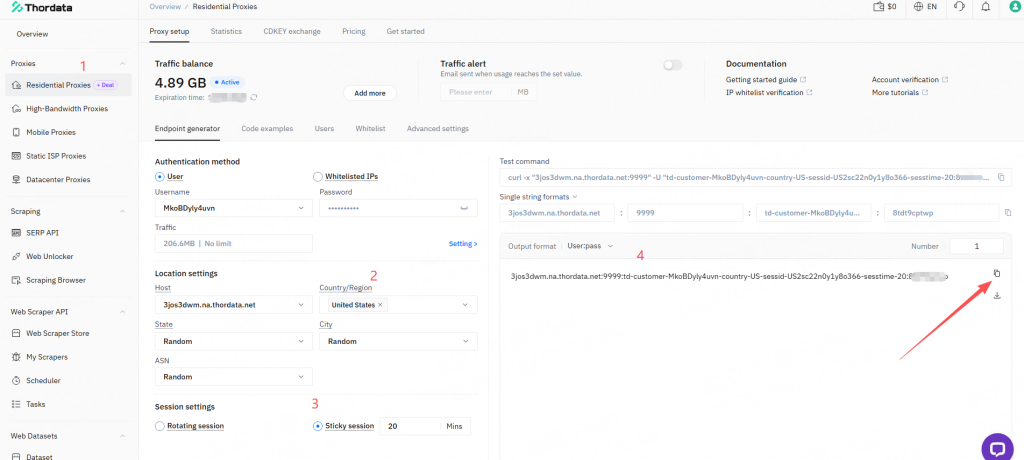
Option 1: Use the Endpoint Generator
Inside the Dashboard, click Endpoint Generator.
This method generates proxy information in one of the following formats:
- username:password
- HTTP proxy endpoint link
You can configure the following parameters:
Location
- Country
- State
- City
- ASN
ASN is an optional setting that helps retrieve proxies from a preferred autonomous system when needed.
Session
- Rotation: Get a new IP for each request
- Sticky Session: Keep the same IP for up to 90 minutes
If your workflow benefits from more frequent IP changes, choose Rotation.
If you need a more stable session for a period of time, choose Sticky Session.
Option 2: Use Whitelist or Password Authentication
If you prefer whitelist authentication, first add your current IP address to the whitelist.
Once that is done, you can use the corresponding proxy connection method.
This approach can be convenient for users who want a simpler authentication workflow.
How to Configure Thordata Proxies in VMLogin
Once your proxy information is ready, you can start configuring VMLogin.
Step 1: Create a New Browser Profile
Open the VMLogin client and log in to your account.
On the homepage, click New Browser Profile.
In the Basic Configuration section, set a clear Display Name, such as:
- Thordata-US-Rotation
- Thordata-DE-Sticky
- Thordata-JP-City-Test
Then click Setting Proxy Server.
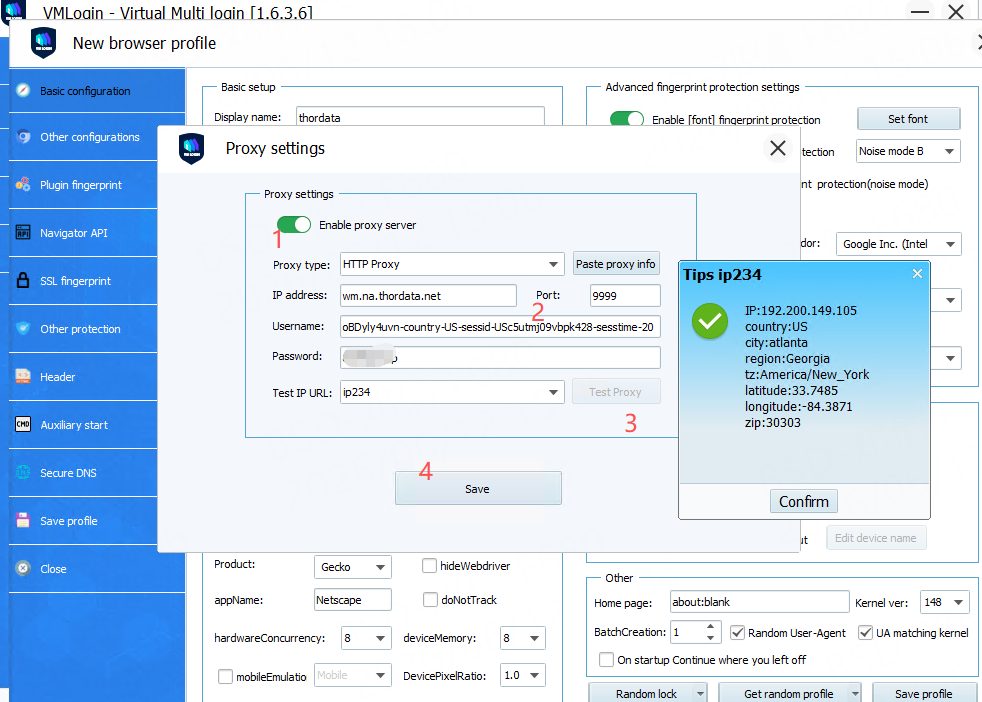
Step 2: Enable the Proxy Server
In the proxy settings page:
- turn on Enable Proxy Server
- choose the required Proxy Type
- paste the proxy details from Thordata into the IP Address field
VMLogin includes a Paste Proxy Info feature, which automatically fills the proxy fields in the correct format.
After that, click Test Proxy to verify the connection.
If the test succeeds, your proxy is configured correctly.
Step 3: Save the Browser Profile
After the proxy test passes, you can configure any additional browser parameters if needed.
Then click Save.
Your new browser profile with the Thordata proxy is now ready.
Return to the browser profile list and double-click the profile to launch it.
At this point, you can start using VMLogin with the configured Thordata proxy.
When to Use Rotation vs Sticky Session
One of the most common setup questions is whether to choose rotating IPs or sticky sessions.
A simple way to decide is:
Rotation is useful for:
- localized content checks
- browsing tests
- larger-scale public web collection
- workflows that need more frequent IP changes
Sticky Session is useful for:
- tasks that need session continuity
- multi-step web activity
- logged-in environment testing
- browser tasks that need a stable IP for a limited time
Thordata supports sticky sessions for up to 90 minutes, which is enough for most session-based workflows.
Practical Tips for Using Thordata + VMLogin
To make the setup smoother and easier to manage, keep these points in mind:
- include country or session type in your profile names
- test proxy connectivity before saving multiple profiles
- use city-level targeting when localized results matter
- add ASN targeting if you need finer network control
- start with a small number of profiles before scaling up
Why This Integration Works Well
From a product integration perspective, Thordata and VMLogin work well together because the setup is easy to follow and flexible enough for different browsing environments.
Key advantages include:
- simple onboarding for new users
- multiple proxy generation methods
- support for detailed location and session settings
- easier coordination between browser profiles and network settings
- a practical use case for teams that want faster proxy deployment inside isolated browser environments
Final Thoughts
If you are looking for a simple way to connect residential proxies to an isolated browser profile environment, Thordata + VMLogin is a practical combination.
With Thordata’s Endpoint Generator, flexible location targeting, and sticky sessions of up to 90 minutes, combined with VMLogin’s browser profile management, users can move from proxy generation to actual browser use in just a few steps.
To get started, register a Thordata account, request a trial from support, and follow the setup process outlined above.
Get started here: thordata.com
 Looking for
Top-Tier Residential Proxies?
Looking for
Top-Tier Residential Proxies?