


Web Scraper API
Fetch real-time data from 100+ websites,No development or maintenance required.
SCRAPING SOLUTIONS
Get accurate and in real-time results sourced from Google, Bing, and more.
With 120+ prebuilt and custom scrapers ready for any use case.
No blocks, no CAPTCHAs—unlock websites seamlessly at scale.
Execute scripts in stealth browsers with full rendering and automation
PROXY INFRASTRUCTURE
Over 100 million real residential IPs from genuine users across 190+ countries.
Reliable mobile data extraction, powered by real 4G/5G mobile IPs.
For time-sensitive tasks, utilize residential IPs with unlimited bandwidth.
Fast and cost-efficient IPs optimized for large-scale scraping.
SCRAPING SOLUTIONS
PROXY INFRASTRUCTURE
DATA FEEDS
Full details on all features, parameters, and integrations, with code samples in every major language.
LEARNING HUB
ALL LOCATIONS Proxy Locations
TOOLS
RESELLER
Get up to 50%
Contact sales:partner@thordata.com
Products $/GB
Fetch real-time data from 100+ websites,No development or maintenance required.
Get real-time results from search engines. Only pay for successful responses.
Execute scripts in stealth browsers with full rendering and automation.
Bid farewell to CAPTCHAs and anti-scraping, scrape public sites effortlessly.
Dataset Marketplace Pre-collected data from 100+ domains.
Over 100 million real residential IPs from genuine users across 190+ countries.
Reliable mobile data extraction, powered by real 4G/5G mobile IPs.
For time-sensitive tasks, utilize residential IPs with unlimited bandwidth.
Fast and cost-efficient IPs optimized for large-scale scraping.

Data for AI $/GB
Pricing $0/GB
Docs $/GB
Full details on all features, parameters, and integrations, with code samples in every major language.
Resource $/GB
EN $/GB
产品 $/GB
AI数据 $/GB
定价 $0/GB
产品文档 $/GB
资源 $/GB
简体中文 $/GB

In so many articles, we discuss how websites track and identify you, even in Incognito mode via browser fingerprinting. However, many users still don’t understand how this phenomenon works or what data it collects. Today, we discuss Browserscan, a tool that validates your fingerprint and shows you what websites see about you.
For instance, using multiple accounts on a social media platform like Instagram or TikTok without confirming your fingerprint’s uniqueness would be treading on thin ice—at risk of your accounts being flagged, shadowbanned, or completely shut down. A quick check on BrowserScan comes in handy here.
In the following sections, we explore how BrowserScan works and how it can help you stay a step ahead of fingerprinting trackers.
Browser fingerprinting is a tracking technique that collects an array of information about the software and hardware characteristics of a device in a bid to identify the user precisely. The information collected may include, but isn’t limited to, the following:
Operating System. Whether you’re using Windows, macOS, Linux, etc.
Timezone and Language. Your local time setting and preferred language.
System Fonts. The installed fonts on the device.
User-Agent. Information about your browser type and version.
Browser Extensions. Any add-ons or plugins you’ve installed in your browser.
Canvas Fingerprint Data. Graphics information that can be pulled from your browser to create a unique image.
Screen Resolution. The exact pixel dimensions of your screen.
Hardware Details. This might include whether your system uses a 32-bit or 64-bit processor, the number of CPU cores, and even graphics card information.
Do Not Track Selection. Your browser’s setting on whether to request that websites Do Not Track your browsing can also be collected.
These data points are collected and combined to create a profile that is as unique as a real fingerprint, making it possible for websites to identify and track you online without the need for cookies.
Whether in the e-commerce sector, social media platforms, advertising placements, or affiliate marketing, multi-account operations have become a common operational strategy. However, the implementation of this strategy may face a neglected risk, that is, the leakage of browser fingerprints!
Browser fingerprints are unique sets of information composed of your device and browser settings. If you use the same device and browser while operating multiple accounts, then the browser fingerprints of these accounts will be identical. This could attract the attention of the platform, as it may be considered as brushing or fraudulent behavior, leading to account bans.
For example, on e-commerce platforms, sellers often create multiple accounts to increase product exposure and sales. However, if the browser fingerprints of these accounts are the same, they may be recognized as spam accounts by the platform, resulting in restrictions or bans.
Similarly, on social media platforms, marketers also create multiple accounts to promote products or brands. If the browser fingerprints of these accounts are the same, they may be recognized as fraudulent behavior by the platform, thereby affecting marketing results and revenue.
Even though many users have become aware of the risks of browser fingerprinting and have started using fingerprint browsers to mask their real device information, this does not mean that their accounts are completely safe.
In fact, due to the different technologies used by different fingerprint browsers, or improper use, personal information may still be leaked, or a false browser fingerprint may be generated. This could lead to the user’s device being marked as suspicious by the website platform, or multiple accounts being marked as associated.
Therefore, when using a fingerprint browser, users need to utilize a tool to:
After confirming the authenticity of the browser fingerprint, it is obviously safer to operate multiple accounts.
BrowserScan is an all-in-one online tool that inspects your browser details to provide a browser fingerprint authenticity score. A score below 90% indicates that you are leaking information that can be used to follow you online or identify multiple accounts. Let’s go over each BrowserScan section.
The overview section displays the main browser fingerprint criteria. Below is an image of a newly installed Brave browser details and its browser fingerprint authenticity.
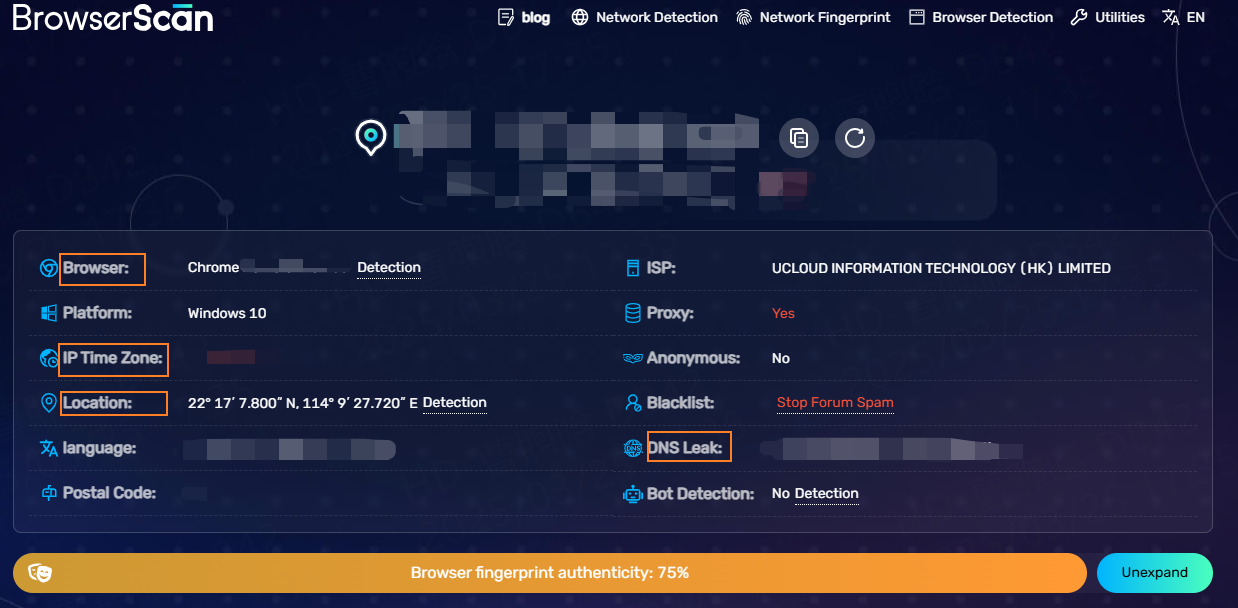
The BrowserScan overview outlines this information:
Notice that even the default Brave browser settings get a 95% fingerprint authenticity score. You will see a -5% for canvas tampering because Brave browser obfuscates some browser details by default.
After the initial overview, scroll down to the What websites see about you section. Let’s overview two elements essential for online privacy: WebRTC and DNS leak protection. In this example, we connected to a proxy server in HK; here are the results.
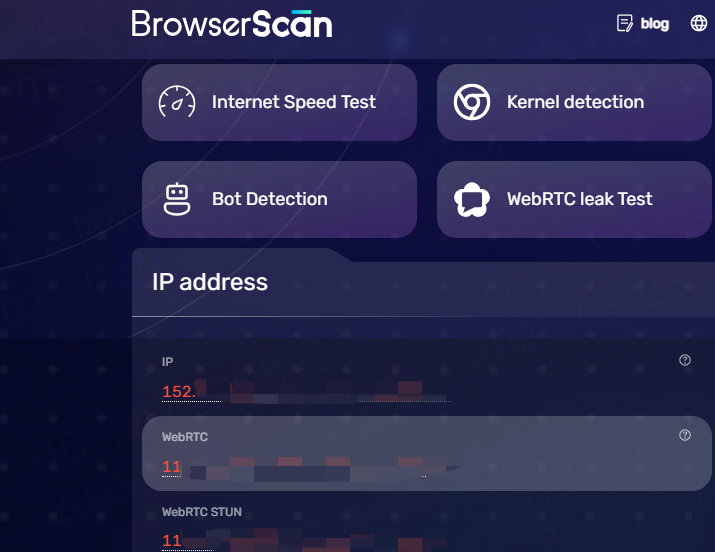
WebRTC is a technology that allows real-time audio and video communication within websites and browsers. However, it bypasses proxies and must specifically have WebRTC leak protection to disable it.
BrowserScan captures the proxy server IP address and its internet service provider in Germany, as seen in the image above. However, because our proxy server does not use additional WebRTC leak protection, the BrowserScan sees my original IP address. Social networks can use this trick to identify multiple accounts from the same source, bypassing IP address obfuscation.
A DNS (domain name system) leak is another issue. Imagine DNS as an internet phone book. Whenever you type the website’s name into your browser (for example, Thordata), it contacts the DNS server to see the IP address for the selected domain. This way, your web browser knows the IP address of the server it is supposed to contact.
DNS leaks happen whenever you obfuscate your original IP address but use the same DNS server. Although a proxy server handles online data flow, your browser sends DNS requests to the original server operated by the original ISP. This way, websites can track a user by monitoring DNS queries.
However, most professional proxies run proprietary DNS servers to prevent this from happening. With IPRoyal proxies, we get an alternative DNS, as seen in the image below.
Next to the leak tests is the Browser section. It displays more browser-specific information, like plugins, user agents, and versions.
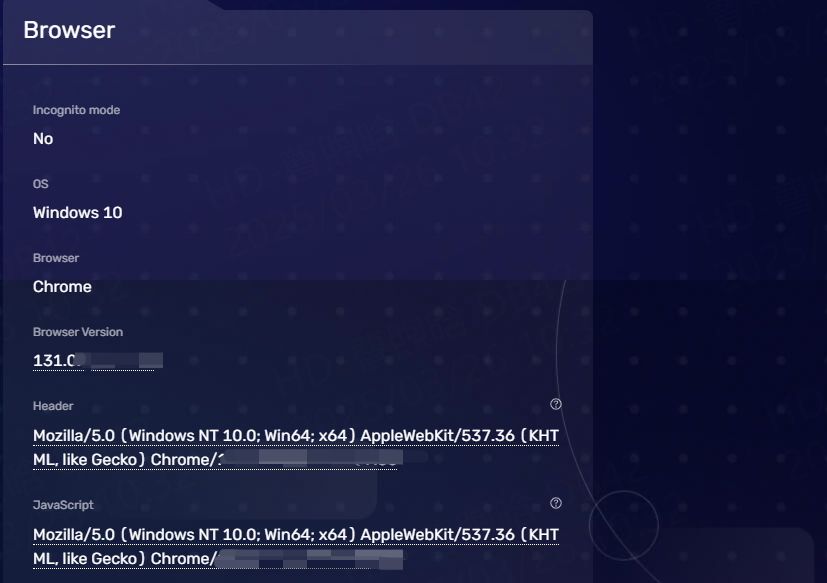
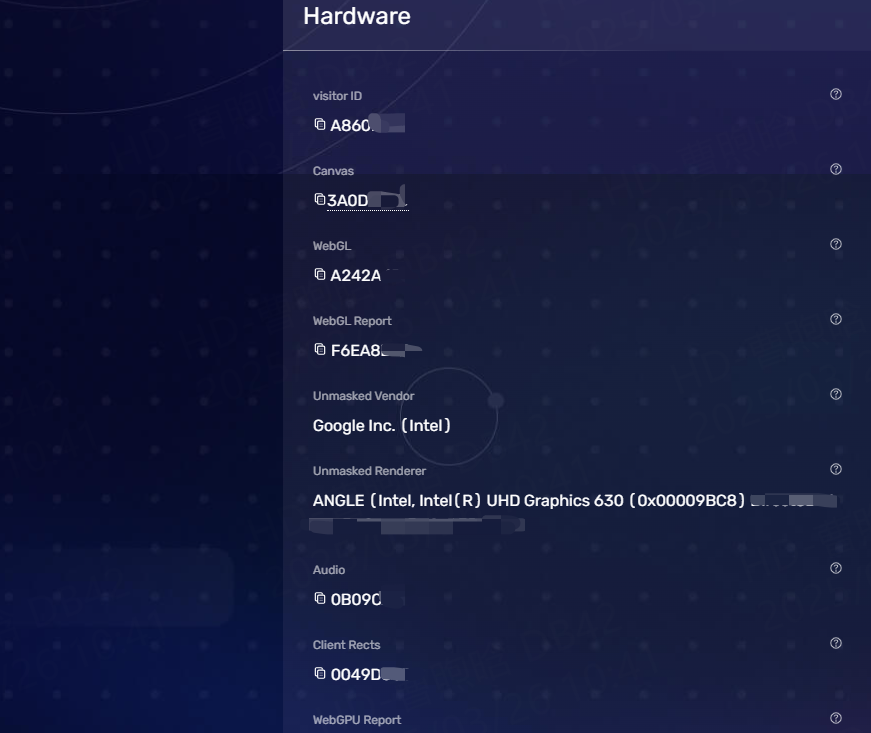
The hardware section shows in-depth information about the device. This is crucial if you use an anti-detect browser or a virtual machine to simulate another device. An anti-detect browser modifies your user agent and can make your Windows laptop appear as a mobile Android device. However, some websites will identify a fake user agent if it does not simulate hardware details.
Beyond the basics, BrowserScan offers a suite of tools to bolster your online security:
First, configure your browser to use Thordata.
If you’re using a different browser, adapt the configuration steps to your browser’s proxy settings.
Once your browser is configured:
1.Open BrowserScan in the browser you just set up.
2.Allow the site to analyze your browser’s settings and fingerprint.
3.Look for details like your IP address and location to confirm that Thordata are working as expected.
Integrating Thordata with BrowserScan allows you to conduct privacy-focused tests, simulate region-specific browsing, and analyze browser configurations securely. Whether you’re managing browser fingerprints or testing anonymous scenarios, Thordata ensures reliable and secure operations. Start optimizing your workflows with Thordata and BrowserScan today!
It’s simple. When you run multiple accounts, Incognito helps keep each one separate and safe. But once you hit that start button, a smart move is to take a quick check, on the BrowserScan tool to confirm your configurations and proxy tools are active, before any other activity online.
This way, you ensure that all the details that could give away your accounts or identify you are hidden just right, and as a result, you can be more confident going about your business.
Frequently asked questions
Can browser fingerprinting be used to hack my accounts?
No, fingerprinting itself isn’t hacking—it’s just tracking. However, if combined with stolen data (like passwords), it could help attackers bypass security checks. Use 2FA to stay safe!
Is spoofing my browser fingerprint legal?
Yes, but bypassing paywalls or scraping against terms of service isn’t. Always respect site rules.
Why do I still get blocked even after using BrowserScan?
Your IP might still be flagged. Pair BrowserScan’s fixes with Thordata’s residential proxies for full invisibility.
About the author
Jenny is a Content Specialist with a deep passion for digital technology and its impact on business growth. She has an eye for detail and a knack for creatively crafting insightful, results-focused content that educates and inspires. Her expertise lies in helping businesses and individuals navigate the ever-changing digital landscape.
The thordata Blog offers all its content in its original form and solely for informational intent. We do not offer any guarantees regarding the information found on the thordata Blog or any external sites that it may direct you to. It is essential that you seek legal counsel and thoroughly examine the specific terms of service of any website before engaging in any scraping endeavors, or obtain a scraping permit if required.
 Looking for
Top-Tier Residential Proxies?您在寻找顶级高质量的住宅代理吗?
Looking for
Top-Tier Residential Proxies?您在寻找顶级高质量的住宅代理吗?
How to Scraping Dynamic Websites with Python?
In this article, learn how to ...
Anna Stankevičiūtė
2026-03-03

Scraping Yahoo Finance using Python
Xyla Huxley Last updated on 2026-03-02 10 min read […]
Unknown
2026-03-03

TCP Deep Dive with Wireshark
Xyla Huxley Last updated on 2026-03-03 6 min read TCP i […]
Unknown
2026-03-03

Web Scraping with Python using Requests
Xyla Huxley Last updated on 2026-03-03 6 min read Web c […]
Unknown
2026-03-03

Crawl4AI: Open-Source AI Web Crawler with MCP Automation
Xyla Huxley Last updated on 2026-03-03 10 min read AI a […]
Unknown
2026-03-03

Using Wget with Python: A Practical Guide for Reliable, Scalable Web Data Retrieval
Xyla Huxley Last updated on 2026-03-03 10 min read […]
Unknown
2026-03-03

How to Make HTTP Requests in Node.js With Fetch API (2026)
A practical 2026 guide to usin ...
Kael Odin
2026-03-03

How to Scrape Job Postings in 2026: Complete Guide
A 2026 end-to-end guide to scr ...
Kale Odin
2026-03-03

BeautifulSoup Tutorial 2026: Parse HTML Data With Python
A 2026 step-by-step BeautifulS ...
Kael Odin
2026-03-03
