


Web Scraper API
Fetch real-time data from 100+ websites,No development or maintenance required.
SCRAPING SOLUTIONS
Get accurate and in real-time results sourced from Google, Bing, and more.
With 120+ prebuilt and custom scrapers ready for any use case.
No blocks, no CAPTCHAs—unlock websites seamlessly at scale.
Execute scripts in stealth browsers with full rendering and automation
PROXY INFRASTRUCTURE
Over 100 million real residential IPs from genuine users across 190+ countries.
Reliable mobile data extraction, powered by real 4G/5G mobile IPs.
For time-sensitive tasks, utilize residential IPs with unlimited bandwidth.
Fast and cost-efficient IPs optimized for large-scale scraping.
SCRAPING SOLUTIONS
PROXY INFRASTRUCTURE
DATA FEEDS
Full details on all features, parameters, and integrations, with code samples in every major language.
LEARNING HUB
ALL LOCATIONS Proxy Locations
TOOLS
RESELLER
Get up to 50%
Contact sales:partner@thordata.com
Products $/GB
Fetch real-time data from 100+ websites,No development or maintenance required.
Get real-time results from search engines. Only pay for successful responses.
Execute scripts in stealth browsers with full rendering and automation.
Bid farewell to CAPTCHAs and anti-scraping, scrape public sites effortlessly.
Dataset Marketplace Pre-collected data from 100+ domains.
Over 100 million real residential IPs from genuine users across 190+ countries.
Reliable mobile data extraction, powered by real 4G/5G mobile IPs.
For time-sensitive tasks, utilize residential IPs with unlimited bandwidth.
Fast and cost-efficient IPs optimized for large-scale scraping.

Data for AI $/GB
Pricing $0/GB
Docs $/GB
Full details on all features, parameters, and integrations, with code samples in every major language.
Resource $/GB
EN $/GB
产品 $/GB
AI数据 $/GB
定价 $0/GB
产品文档 $/GB
资源 $/GB
简体中文 $/GB

MSXML2.ServerXMLHTTP.6.0. It is 50x faster than automating browsers and supports modern TLS 1.3 security protocols essential for scraping today’s web.Set-Cookie headers from a login POST request and pass them to subsequent GET requests to maintain session state.Excel remains the lifeblood of the financial world. While Python is the standard for large-scale data engineering, millions of analysts still live inside spreadsheets. You need data—live stock prices, currency rates, competitor SKUs—directly in your cells, instantly, without switching windows.
However, 90% of VBA tutorials online are dangerously outdated. They suggest using InternetExplorer.Application or the older WinHttp object. Do not do this. IE is dead, and WinHttp often fails on modern websites requiring TLS 1.3 encryption.
In this comprehensive guide, I will show you the professional way to scrape with VBA: Headless HTTP Requests via MSXML2. This method runs silently in the background, handles modern encryption, and integrates with professional proxy networks.
Before writing a single line of code, we need to equip Excel with the right libraries. We are not recording a macro; we are building a robust script.
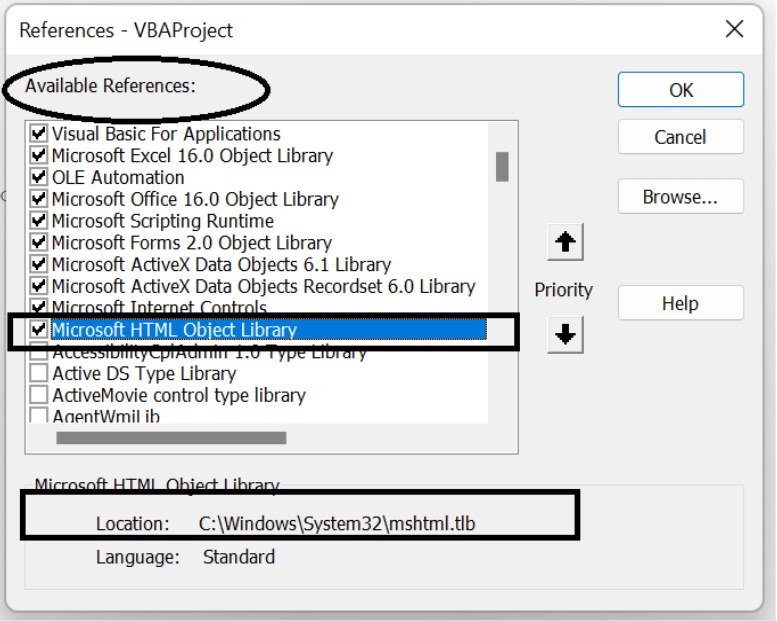 Figure 1: Inside the VBA Editor (Alt + F11), go to Tools > References.
Ensure you check these three critical references:
Why switch from Browser Automation to HTTP Requests? Speed and Stability.
When you automate a browser, it renders images, executes JavaScript, and loads ads. When you use ServerXMLHTTP, you only download the raw data. In Thordata’s internal benchmarks, fetching a stock price via XMLHTTP takes 0.3 seconds, whereas automating a Chrome window takes 4-8 seconds.
Many legacy scripts use WinHttp. However, this older library relies heavily on OS-level settings for TLS protocols. On Windows 7 or unpatched Windows 10/11 machines, it often fails to handshake with modern secure sites (like those behind Cloudflare). MSXML2.ServerXMLHTTP.6.0 is more robust and server-independent.
Let’s create a subroutine that fetches a webpage. We will implement proper error handling and User-Agent spoofing to avoid immediate blocking.
Sub ModernScraper()
    Dim xmlHttp As New MSXML2.ServerXMLHTTP60
    Dim htmlDoc As New MSHTML.HTMLDocument
    Dim url As String

    url = "https://books.toscrape.com/"

    With xmlHttp
        ' False = Synchronous (Code waits for response)
        .Open "GET", url, False

        ' CRITICAL: Fake the headers to look like a real browser
        .setRequestHeader "User-Agent", "Mozilla/5.0 (Windows NT 10.0; Win64; x64) Chrome/120.0.0.0 Safari/537.36"
        .setRequestHeader "Accept", "text/html,application/xhtml+xml,application/xml;q=0.9,*/*;q=0.8"
        .setRequestHeader "Accept-Language", "en-US,en;q=0.9"

        .send

        If .Status <> 200 Then
            MsgBox "Error: " & .Status & " - " & .statusText
            Exit Sub
        End If

        ' Load response text into the HTML Parser
        htmlDoc.body.innerHTML = .responseText
    End With

    ' Extract Data using standard DOM methods
    Debug.Print "Page Title: " & htmlDoc.Title

End SubThis is where expert analysts differ from beginners. Most financial sites (Yahoo Finance, NASDAQ, Crypto exchanges) actually load their data via hidden API calls.
Why scrape HTML tables when you can get structured JSON?
Since VBA does not handle JSON natively, you must use the VBA-JSON library. Import the JsonConverter.bas module into your project.
Sub GetCryptoPrices()
    Dim xmlHttp As New MSXML2.ServerXMLHTTP60
    Dim Json As Object
    Dim rate As Double

    ' Target a real JSON API endpoint (e.g., CoinDesk)
    xmlHttp.Open "GET", "https://api.coindesk.com/v1/bpi/currentprice.json", False
    xmlHttp.send

    ' Parse JSON string to a Scripting.Dictionary
    Set Json = JsonConverter.ParseJson(xmlHttp.responseText)

    ' Navigate the JSON structure: Root -> bpi -> USD -> rate_float
    rate = Json("bpi")("USD")("rate_float")

    ' Write directly to Excel cells
    Range("A1").Value = "Bitcoin (USD)"
    Range("B1").Value = rate
    Range("C1").Value = Now

    Debug.Print "Success: BTC is " & rate

End SubA common pain point: “I can scrape the public page, but how do I scrape data behind a login?”
VBA HTTP requests are stateless. They don’t “remember” you logged in. You must manually catch the `Set-Cookie` header from the login response and attach it to subsequent requests. Here is the blueprint:
Sub ScrapeWithLogin()
    Dim xmlHttp As New MSXML2.ServerXMLHTTP60
    Dim myCookie As String

    ' Step 1: POST Credentials to Login URL
    xmlHttp.Open "POST", "https://example.com/login", False
    xmlHttp.setRequestHeader "Content-Type", "application/x-www-form-urlencoded"
    xmlHttp.send "username=myUser&password=myPass"

    ' Step 2: Extract the Session Cookie
    myCookie = xmlHttp.getResponseHeader("Set-Cookie")

    ' Step 3: Use Cookie to Get Private Data
    xmlHttp.Open "GET", "https://example.com/my-dashboard", False
    xmlHttp.setRequestHeader "Cookie", myCookie ' Pass the cookie back
    xmlHttp.send

    Debug.Print xmlHttp.responseText ' Contains logged-in content

End SubFinancial scraping often involves high-frequency requests. If you check stock prices every minute from your office IP, you will likely get banned. You need Residential Proxies.
While `ServerXMLHTTP` supports proxies, handling the “Username/Password” popup window in VBA is notoriously unstable and often interrupts the script. The best practice is to use IP Whitelisting via the Thordata dashboard.
Sub ScrapeWithThordata()
    Dim xmlHttp As New MSXML2.ServerXMLHTTP60

    With xmlHttp
        .Open "GET", "https://api.ipify.org", False

        ' Configuration for Thordata Proxy Gateway
        ' SXH_PROXY_SET_PROXY = 2
        .setProxy 2, "gate.thordata.com:12345"

        ' Using IP Whitelisting (Recommended): No credentials needed in code
        ' If using User/Pass auth, uncomment below:
        ' .setProxyCredentials "YOUR_USER", "YOUR_PASS"

        .send
        Debug.Print "Scraping via IP: " & .responseText
    End With

End SubVBA is not dead; it just needs to be used correctly. By abandoning browser automation in favor of `ServerXMLHTTP` and JSON parsing, you can build financial scrapers that are fast, lightweight, and integrated directly into your reporting workflow.
Ready to scale your Excel models? Start by integrating high-quality residential proxies to prevent data feed interruptions.

Frequently asked questions
Why is ‘InternetExplorer.Application’ not working in Windows 11?
Microsoft officially retired the standalone IE desktop application. While some legacy modes exist, automation via VBA’s IE object is unstable. The industry standard is now ‘MSXML2.ServerXMLHTTP’ for headless requests.
Can Excel VBA scrape JavaScript-rendered sites?
Not natively via HTTP requests. For sites like React/Angular SPAs, you must either find the hidden JSON API endpoint (recommended) or use the ‘SeleniumBasic’ wrapper to drive Chrome/Edge from within VBA.
How do I parse JSON API responses in Excel?
VBA has no native JSON parser. You should use the open-source ‘VBA-JSON’ library (JsonConverter.bas) to convert API strings into accessible Dictionaries and Collections.
About the author
Kael is a Senior Technical Copywriter at Thordata. He works closely with data engineers to document best practices for bypassing anti-bot protections. He specializes in explaining complex infrastructure concepts like residential proxies and TLS fingerprinting to developer audiences. All code examples in this article have been tested in real-world scraping scenarios.
The thordata Blog offers all its content in its original form and solely for informational intent. We do not offer any guarantees regarding the information found on the thordata Blog or any external sites that it may direct you to. It is essential that you seek legal counsel and thoroughly examine the specific terms of service of any website before engaging in any scraping endeavors, or obtain a scraping permit if required.
 Looking for
Top-Tier Residential Proxies?您在寻找顶级高质量的住宅代理吗?
Looking for
Top-Tier Residential Proxies?您在寻找顶级高质量的住宅代理吗?
How to Scraping Dynamic Websites with Python?
In this article, learn how to ...
Anna Stankevičiūtė
2026-03-03

Scraping Yahoo Finance using Python
Xyla Huxley Last updated on 2026-03-02 10 min read […]
Unknown
2026-03-03

TCP Deep Dive with Wireshark
Xyla Huxley Last updated on 2026-03-03 6 min read TCP i […]
Unknown
2026-03-03

Web Scraping with Python using Requests
Xyla Huxley Last updated on 2026-03-03 6 min read Web c […]
Unknown
2026-03-03

Crawl4AI: Open-Source AI Web Crawler with MCP Automation
Xyla Huxley Last updated on 2026-03-03 10 min read AI a […]
Unknown
2026-03-03

Using Wget with Python: A Practical Guide for Reliable, Scalable Web Data Retrieval
Xyla Huxley Last updated on 2026-03-03 10 min read […]
Unknown
2026-03-03

How to Make HTTP Requests in Node.js With Fetch API (2026)
A practical 2026 guide to usin ...
Kael Odin
2026-03-03

How to Scrape Job Postings in 2026: Complete Guide
A 2026 end-to-end guide to scr ...
Kale Odin
2026-03-03

BeautifulSoup Tutorial 2026: Parse HTML Data With Python
A 2026 step-by-step BeautifulS ...
Kael Odin
2026-03-03
