


Web Scraper API
Fetch real-time data from 100+ websites,No development or maintenance required.
SCRAPING SOLUTIONS
Get accurate and in real-time results sourced from Google, Bing, and more.
With 120+ prebuilt and custom scrapers ready for any use case.
No blocks, no CAPTCHAs—unlock websites seamlessly at scale.
Execute scripts in stealth browsers with full rendering and automation
PROXY INFRASTRUCTURE
Over 100 million real residential IPs from genuine users across 190+ countries.
Reliable mobile data extraction, powered by real 4G/5G mobile IPs.
For time-sensitive tasks, utilize residential IPs with unlimited bandwidth.
Fast and cost-efficient IPs optimized for large-scale scraping.
SCRAPING SOLUTIONS
PROXY INFRASTRUCTURE
DATA FEEDS
Full details on all features, parameters, and integrations, with code samples in every major language.
LEARNING HUB
ALL LOCATIONS Proxy Locations
TOOLS
RESELLER
Get up to 50%
Contact sales:partner@thordata.com
Products $/GB
Fetch real-time data from 100+ websites,No development or maintenance required.
Get real-time results from search engines. Only pay for successful responses.
Execute scripts in stealth browsers with full rendering and automation.
Bid farewell to CAPTCHAs and anti-scraping, scrape public sites effortlessly.
Dataset Marketplace Pre-collected data from 100+ domains.
Over 100 million real residential IPs from genuine users across 190+ countries.
Reliable mobile data extraction, powered by real 4G/5G mobile IPs.
For time-sensitive tasks, utilize residential IPs with unlimited bandwidth.
Fast and cost-efficient IPs optimized for large-scale scraping.

Data for AI $/GB
Pricing $0/GB
Docs $/GB
Full details on all features, parameters, and integrations, with code samples in every major language.
Resource $/GB
EN $/GB
产品 $/GB
AI数据 $/GB
定价 $0/GB
产品文档 $/GB
资源 $/GB
简体中文 $/GB


The PlayStation 4 (PS4) is one of the most popular gaming consoles today, offering a wide range of games and services, such as voice chat, community features, and online game downloads. However, your gaming experience may sometimes be affected by network restrictions, slow speeds, or regional limitations. For PS4 users, a proxy server is an ideal solution to tackle these issues. But what exactly is a PS4 proxy server, and how can you set it up? Let’s dive into the details.
A proxy server is an effective way for PS4 players to connect online while protecting their identities. A PS4 proxy server acts as an intermediary between your console and the internet. When you connect your PS4 to a proxy server, your internet traffic is routed through that server. This can help in several ways, such as improving connection speeds, reducing latency, and providing anonymity while gaming.
You might consider using a proxy server on your PS4 for several reasons:
One of the main reasons gamers use proxies is to reduce latency and improve connection speed. By selecting a proxy server closer to the game server you’re trying to connect to, you can reduce the physical distance data has to travel. This helps lower ping and improves overall gaming performance, especially in competitive games where every millisecond counts.
Some games, movies, or features on PS4 are limited to certain countries or regions. This can be frustrating if certain content is unavailable in your area. Proxy servers allow you to mask your real location, making it appear as though you are accessing the internet from another region, thus bypassing geographic restrictions.
If you’re concerned about your online privacy or the possibility of being tracked, a proxy can provide additional security. It hides your real IP address and encrypts your traffic, making it harder for websites or hackers to monitor your activity or obtain your personal information.
In some cases, your Internet Service Provider (ISP) or even your network administrator may impose restrictions on certain websites or services. A proxy server can help you bypass these restrictions, granting you access to a broader range of content that you might not otherwise be able to view or download.
Setting up a proxy server on your PS4 is a straightforward process. Here is a step-by-step guide to help you get started. You will need a proxy server to connect to, and then you can configure your PS4 to use that server.
First, you need to acquire a proxy server. Thordata offers affordable proxy solutions with top-notch services. With over 60 million ethical IP addresses across 195 countries, including residential, data center, and ISP proxies, Thordata is a reliable option.
Residential proxies are often the best choice for PS4 because they provide high anonymity, can bypass geographic restrictions, and are less likely to be detected by services like PlayStation Network.
(1)Start PS4:
Turn on your PS4 console and ensure it is connected to the internet.
(2)Go to the Settings Menu:
On the main interface, find and select the “Settings” icon.

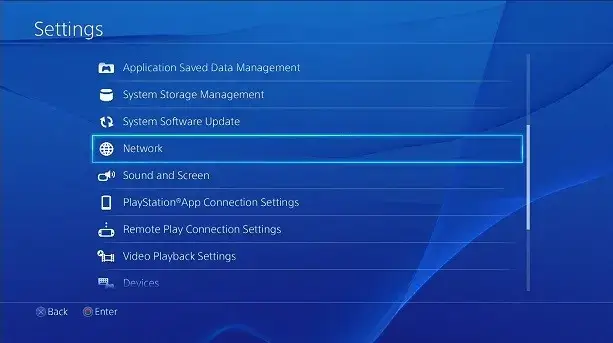
(3)Select the Network Option:
In the “Settings” menu, scroll down and select “Network.”
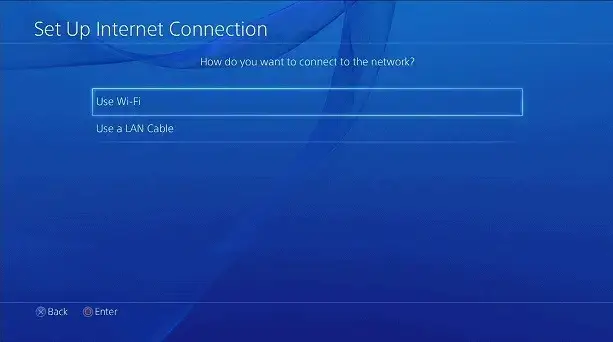
(1)Select Your Connection Method:
Depending on your situation, choose how you want to connect: Wi-Fi or LAN cable (wired connection).
If you choose Wi-Fi, select the Wi-Fi network you want to connect to and enter the password.
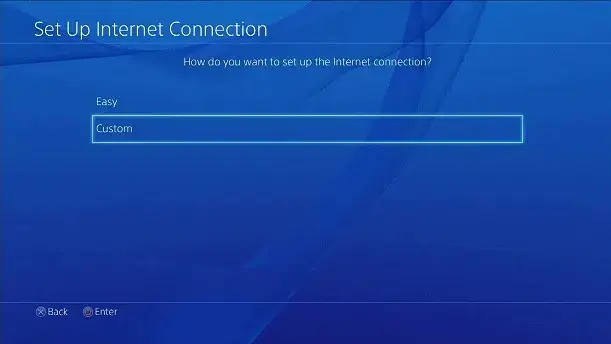
(2)Choose Custom Settings:
In the next options, choose “Custom” to manually configure the network settings.
Step 4: Configure Network Settings
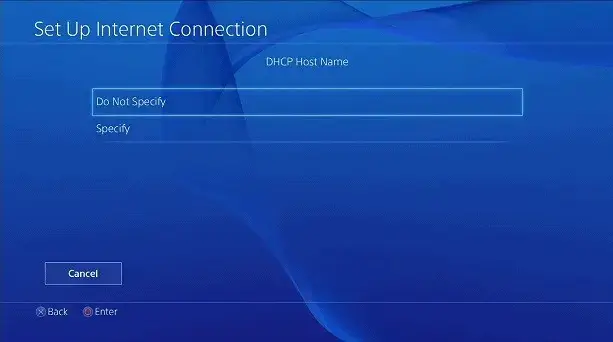
DHCP Host Name:
Choose “Do Not Specify.”
DNS Settings:
Select “Automatic.”
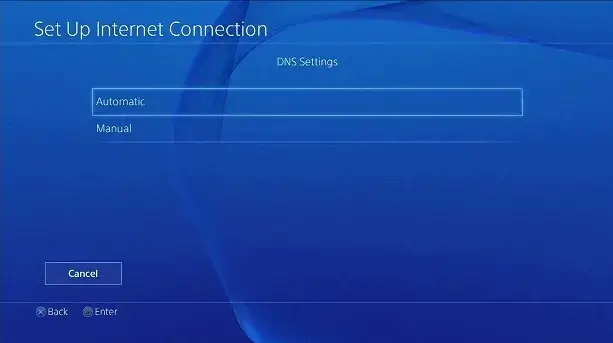
MTU Settings:
Select “Automatic.”
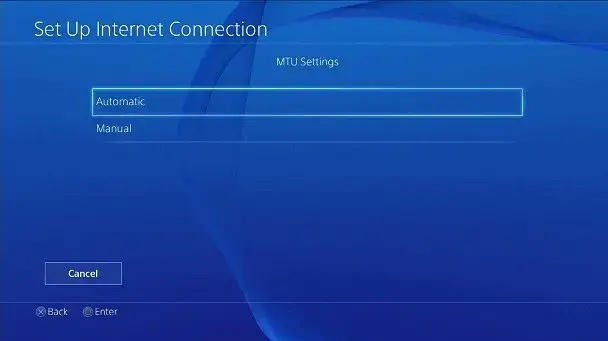
Proxy Server Settings:
In the “Proxy Server” settings, select “Use.”
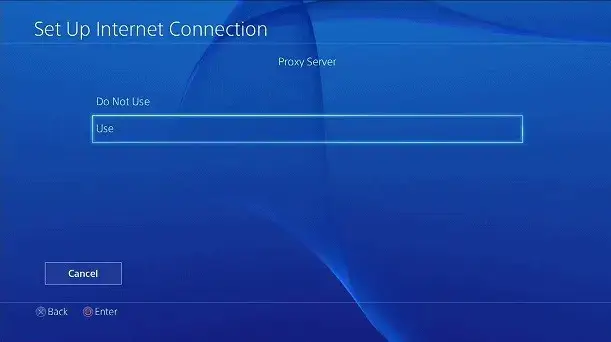
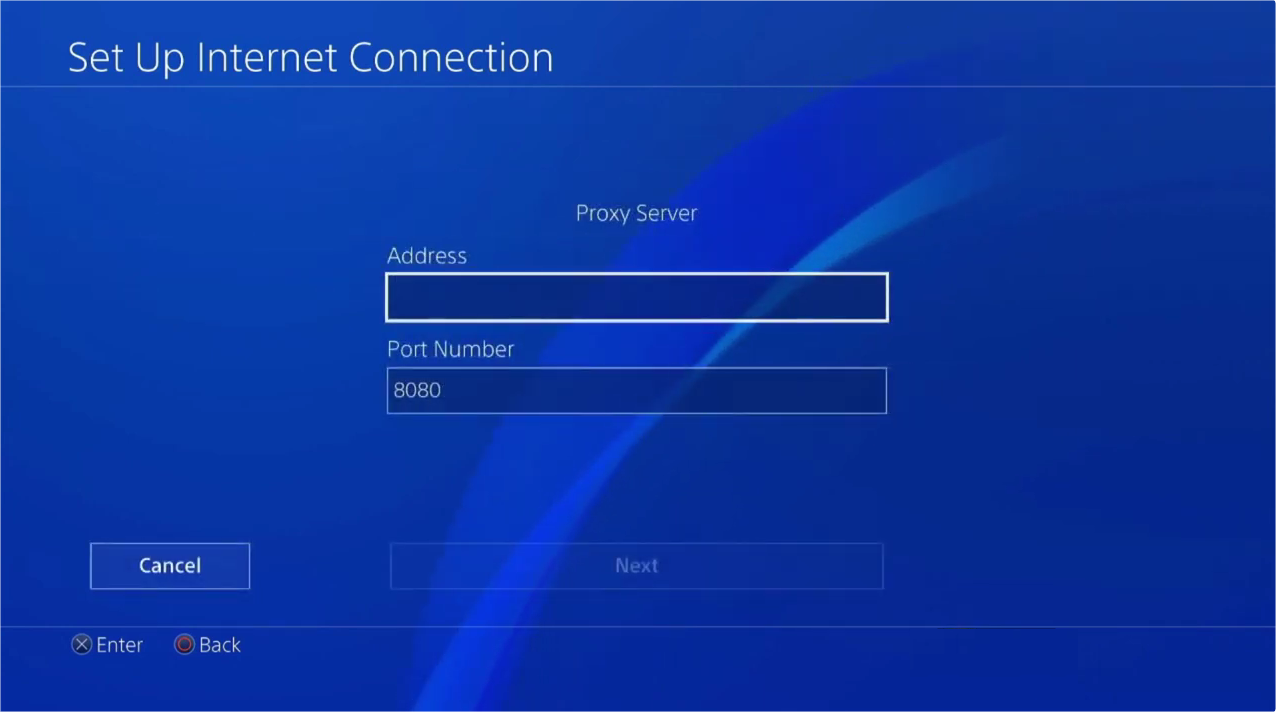
Enter Proxy Server Information:
IP Address: Enter the proxy server IP address provided by your proxy service provider.
Port Number: Enter the proxy server’s port number (usually 8080 or another specified port).
Restart Your PS4:
To ensure the settings take effect, restart your PS4 or PS5 console.
Check Network Performance:
Launch an online game or download content to check if the network connection is working properly. If the connection test is successful, your PS4 is now using the proxy server. If there are issues, double-check your proxy settings and ensure your internet connection is stable.
While setting up a proxy server on your PS4 is usually simple, you may encounter some issues. Here are some common problems and how to solve them:
Connection Failure:If your PS4 fails to connect, double-check the proxy server address and port number. Make sure they are entered correctly.
Slow Connection Speeds:If you experience slow speeds, try switching to a different proxy server. Some servers may be overloaded or not optimized for gaming.
Proxy Server Not Responding:If the proxy server is down, switch to another server or contact your provider for support.
Error Messages:If you receive proxy-related error messages, consider temporarily disabling the proxy to see if the issue persists.
Network Settings:Ensure that the network settings on your PS4 are configured correctly. Sometimes resetting network settings can resolve connection issues.
While using a proxy server offers many advantages, keep these points in mind:
Speed:
Proxies can sometimes slow down your connection. Make sure you use a high-quality, fast proxy service to avoid latency.
Security:
Ensure your proxy provider is trustworthy. Poor-quality proxies may leak your data or even harm your device.
Reliability:
Choose a provider with a good track record. Look for those that offer reliable connections and customer support when issues arise.
Using a PS4 proxy server is a great way to enhance your gaming experience, bypass restrictions, and improve privacy. With just a few simple steps, you can configure your PS4 to use a proxy server and start benefiting from improved connection speeds, access to geo-blocked content, and better online privacy.
We hope the information provided is helpful. However, if you have any further questions, feel free to contact us at support@thordata.com or via online chat.
Frequently asked questions
What is the best proxy server for PS4?
For PS4, the best proxy server is a residential proxy server. Because residential proxies use real IP addresses, they provide a more stable, secure connection, and reduce latency and increase speed when playing games and watching streaming content.
About the author
Yulia is a dynamic content manager with extensive experience in social media, project management, and SEO content marketing. She is passionate about exploring new trends in technology and cybersecurity, especially in data privacy and encryption. In her free time, she enjoys relaxing with yoga and trying new dishes.
The thordata Blog offers all its content in its original form and solely for informational intent. We do not offer any guarantees regarding the information found on the thordata Blog or any external sites that it may direct you to. It is essential that you seek legal counsel and thoroughly examine the specific terms of service of any website before engaging in any scraping endeavors, or obtain a scraping permit if required.
 Looking for
Top-Tier Residential Proxies?您在寻找顶级高质量的住宅代理吗?
Looking for
Top-Tier Residential Proxies?您在寻找顶级高质量的住宅代理吗?
How to Scraping Dynamic Websites with Python?
In this article, learn how to ...
Anna Stankevičiūtė
2026-03-03

Scraping Yahoo Finance using Python
Xyla Huxley Last updated on 2026-03-02 10 min read […]
Unknown
2026-03-03

TCP Deep Dive with Wireshark
Xyla Huxley Last updated on 2026-03-03 6 min read TCP i […]
Unknown
2026-03-03

Web Scraping with Python using Requests
Xyla Huxley Last updated on 2026-03-03 6 min read Web c […]
Unknown
2026-03-03

Crawl4AI: Open-Source AI Web Crawler with MCP Automation
Xyla Huxley Last updated on 2026-03-03 10 min read AI a […]
Unknown
2026-03-03

Using Wget with Python: A Practical Guide for Reliable, Scalable Web Data Retrieval
Xyla Huxley Last updated on 2026-03-03 10 min read […]
Unknown
2026-03-03

How to Make HTTP Requests in Node.js With Fetch API (2026)
A practical 2026 guide to usin ...
Kael Odin
2026-03-03

How to Scrape Job Postings in 2026: Complete Guide
A 2026 end-to-end guide to scr ...
Kale Odin
2026-03-03

BeautifulSoup Tutorial 2026: Parse HTML Data With Python
A 2026 step-by-step BeautifulS ...
Kael Odin
2026-03-03
