


Residential Proxies
Over 60 million real residential IPs from genuine users across 190+ countries.
Your First Plan is on Us!
Get 100% of your first residential proxy purchase back as wallet balance, up to $900.
PROXY SOLUTIONS
Over 60 million real residential IPs from genuine users across 190+ countries.
Reliable mobile data extraction, powered by real 4G/5G mobile IPs.
Guaranteed bandwidth — for reliable, large-scale data transfer.
For time-sensitive tasks, utilize residential IPs with unlimited bandwidth.
Fast and cost-efficient IPs optimized for large-scale scraping.
A powerful web data infrastructure built to power AI models, applications, and agents.
High-speed, low-latency proxies for uninterrupted video data scraping.
Extract video and metadata at scale, seamlessly integrate with cloud platforms and OSS.
6B original videos from 700M unique channels - built for LLM and multimodal model training.
Get accurate and in real-time results sourced from Google, Bing, and more.
Execute scripts in stealth browsers with full rendering and automation
No blocks, no CAPTCHAs—unlock websites seamlessly at scale.
Get instant access to ready-to-use datasets from popular domains.
PROXY PRICING
Full details on all features, parameters, and integrations, with code samples in every major language.
LEARNING HUB
ALL LOCATIONS Proxy Locations
TOOLS
RESELLER
Get up to 50%
Contact sales:partner@thordata.com
Proxies $/GB
Over 60 million real residential IPs from genuine users across 190+ countries.
Reliable mobile data extraction, powered by real 4G/5G mobile IPs.
For time-sensitive tasks, utilize residential IPs with unlimited bandwidth.
Fast and cost-efficient IPs optimized for large-scale scraping.
Guaranteed bandwidth — for reliable, large-scale data transfer.
Scrapers $/GB
Fetch real-time data from 100+ websites,No development or maintenance required.
Get real-time results from search engines. Only pay for successful responses.
Execute scripts in stealth browsers with full rendering and automation.
Bid farewell to CAPTCHAs and anti-scraping, scrape public sites effortlessly.
Dataset Marketplace Pre-collected data from 100+ domains.

Data for AI $/GB
A powerful web data infrastructure built to power AI models, applications, and agents.
High-speed, low-latency proxies for uninterrupted video data scraping.
Extract video and metadata at scale, seamlessly integrate with cloud platforms and OSS.
6B original videos from 700M unique channels - built for LLM and multimodal model training.
Pricing $0/GB
Starts from
Starts from
Starts from
Starts from
Starts from
Starts from
Starts from
Starts from
Docs $/GB
Full details on all features, parameters, and integrations, with code samples in every major language.
Resource $/GB
EN
首单免费!
首次购买住宅代理可获得100%返现至钱包余额,最高$900。
代理 $/GB
数据采集 $/GB
AI数据 $/GB
定价 $0/GB
产品文档
资源 $/GB
简体中文$/GB
Blog
Scraper

undetected-chromedriver or specialized Residential Proxies to evade detection.In the high-stakes world of web scraping, the choice between Puppeteer and Selenium determines more than just your coding language—it dictates your success rate against modern anti-bot systems. It is no longer just about clicking buttons; it’s about bypassing sophisticated defenses that analyze your TLS fingerprint, JavaScript execution time, and mouse movements.
At Thordata, our infrastructure processes millions of browser automation requests daily. We’ve moved beyond the basic “Python vs. JavaScript” debate to analyze the architectural limitations of each tool. In this benchmark, we strip away the marketing fluff and look at latency, memory footprint, detection rates, and maintainability in a production environment.
Selenium defined the industry. Built on the W3C WebDriver standard, its primary design goal is testing web applications across different browsers (Chrome, Firefox, Safari, IE). While it supports nearly every programming language (Python, Java, C#, Ruby), this broad compatibility comes with a significant performance cost for data extraction.
Maintained by Google’s Chrome team, Puppeteer provides a high-level API over the Chrome DevTools Protocol (CDP). Unlike Selenium, Puppeteer targets Chromium-based browsers specifically. This narrow focus allows for deep, low-level control—like intercepting network packets, analyzing performance traces, or manipulating headers on the fly—that standard WebDriver cannot achieve natively.
We cannot ignore Microsoft’s Playwright. It is essentially the spiritual successor to Puppeteer, offering CDP-like speed with cross-browser support (Webkit, Firefox). While Puppeteer remains the standard for Node.js scraping due to its massive plugin ecosystem (like puppeteer-extra), Playwright is the superior choice if you need Python support with modern architecture. Note: Thordata proxies support all three effortlessly.
The speed difference isn’t magic; it’s protocol-based. This architectural divergence creates the performance gap we see in benchmarks.
Selenium commands operate via a REST-like API. When you execute driver.get(url), the client sends an HTTP request to the Driver Server (e.g., ChromeDriver), which translates it for the browser, executes it, and sends an HTTP response back. This Request/Response cycle happens for every single action (click, scroll, find element), introducing significant latency, especially when using remote proxies where round-trip times matter.
Puppeteer opens a permanent WebSocket connection to the browser via CDP. Communication is bi-directional and asynchronous. The browser can “push” events to your script (e.g., “Network request #402 failed” or “DOM node inserted”) instantly without polling. This architecture allows Puppeteer to block heavy assets (ads, trackers, high-res images) before they even start downloading.
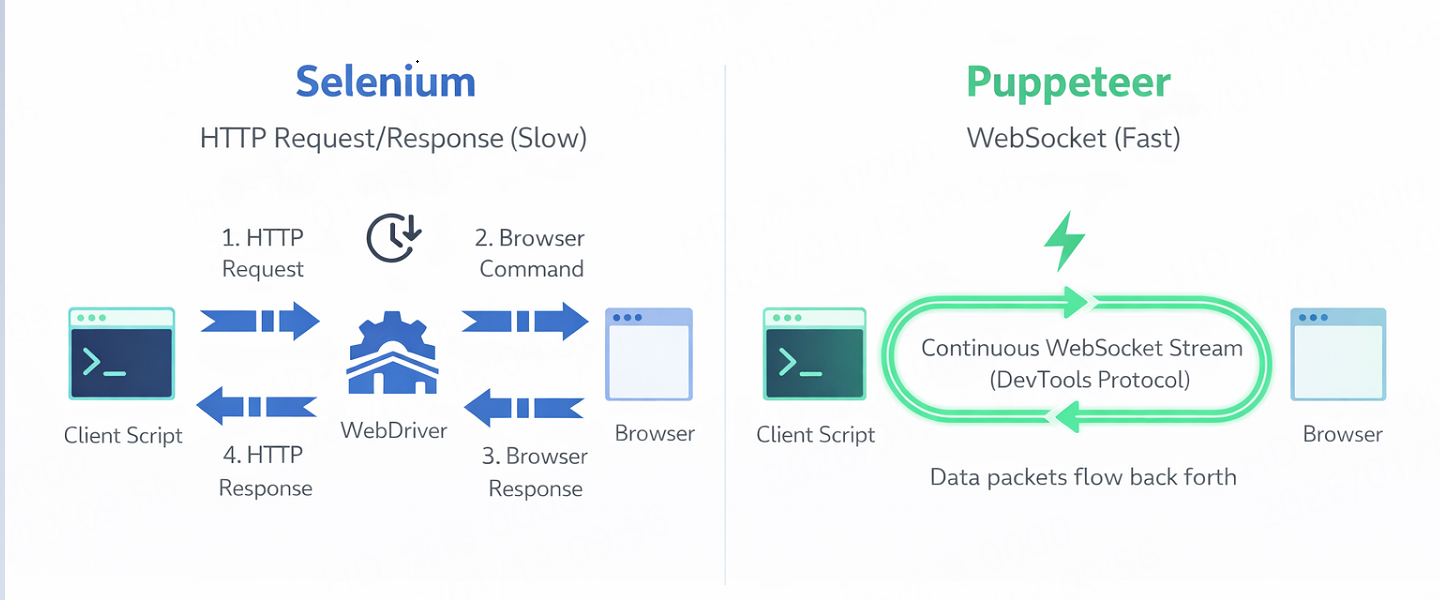 Figure 1: Selenium’s synchronous HTTP cycle vs. Puppeteer’s persistent WebSocket stream.
We ran a controlled test scraping a heavy E-commerce Single Page Application (SPA) with infinite scroll and 50 product images per load. Both scripts were run on the same AWS t3.medium instance using Thordata Residential Proxies to simulate real-world conditions.
| Metric | Selenium (Python) | Puppeteer (Node.js) | Winner |
|---|---|---|---|
| Cold Boot Time | 1.2s | 0.6s | Puppeteer |
| Full Page Load (Assets) | 4.5s | 3.8s | Puppeteer |
| Optimized Load (Blocked Images) | N/A (Difficult to implement) | 1.2s (Request Interception) | Puppeteer (Huge Win) |
| Memory Usage (Headless) | 450MB / Tab | 380MB / Tab | Puppeteer |
| Detection Rate (Stock) | Detected by Cloudflare | Detected by Cloudflare | Tie (Both need plugins) |
The ability to block resource requests (images, CSS, fonts, analytics scripts) is the single biggest factor in scraping efficiency. Puppeteer does this natively with request.abort(). Doing this in Selenium usually requires setting up an external MITM proxy (like mitmproxy), which adds complexity and instability points.
Code that works on your local machine often fails in production. Below are robust examples designed to evade basic detection while integrating Thordata’s infrastructure.
Standard Selenium adds a navigator.webdriver = true property that screams “I am a robot.” In production, you should use the undetected-chromedriver patch to patch the binary directly.
import undetected_chromedriver as uc
import time
from selenium.webdriver.common.by import By
from selenium.webdriver.support.ui import WebDriverWait
from selenium.webdriver.support import expected_conditions as EC

# Configure options to minimize detection
options = uc.ChromeOptions()
options.add_argument('--no-first-run')
options.add_argument('--no-service-autorun')
options.add_argument('--password-store=basic')

# Thordata Proxy Integration (Format: host:port)
# Note: Authenticated proxies in Selenium need specific extensions or local forwarding
# options.add_argument('--proxy-server=http://pr.thordata.net:9999')

# Initialize the patched driver
driver = uc.Chrome(options=options, version_main=120)

try:
    driver.get("https://nowsecure.nl") # Test site for detection

    # Explicit waits are mandatory for modern SPAs
    element = WebDriverWait(driver, 20).until(
        EC.presence_of_element_located((By.CSS_SELECTOR, "h1"))
    )
    print(f"Success: {element.text}")

finally:
driver.quit()Puppeteer wins on granular control. The following script uses puppeteer-extra-plugin-stealth to mask the bot and blocks images to save bandwidth.
const puppeteer = require('puppeteer-extra');
const StealthPlugin = require('puppeteer-extra-plugin-stealth');

// Apply stealth evasion techniques automatically
puppeteer.use(StealthPlugin());

(async () => {
    // Thordata Residential Proxy (Host:Port)
    const PROXY_SERVER = 'pr.thordata.net:9999';

    const browser = await puppeteer.launch({
        headless: "new",
        args: [
            `--proxy-server=http://${PROXY_SERVER}`,
            '--no-sandbox'
        ]
    });

    const page = await browser.newPage();

    // Authenticate with Thordata Credentials
    await page.authenticate({
        username: 'td-customer-USER',
        password: 'PASSWORD'
    });

    // Enable Request Interception to BLOCK images/fonts
    await page.setRequestInterception(true);

    page.on('request', (req) => {
        const type = req.resourceType();
        if (['image', 'media', 'font'].includes(type)) {
            req.abort(); // Save bandwidth & speed up load
        } else {
            req.continue();
        }
    });

    await page.goto('https://bot.sannysoft.com', { waitUntil: 'networkidle2' });
    await page.screenshot({ path: 'stealth_check.png', fullPage: true });

    await browser.close();
})();Most developers obsess over User-Agents, but modern anti-bots (Cloudflare Turnstile, Datadome, Akamai) look deeply at your TLS Fingerprint (JA3/JA4). This is the cryptographic handshake your client makes with the server.
Standard Node.js (used by Puppeteer) and Python (used by Selenium) have distinct TLS signatures that differ from a real Chrome browser. Because Puppeteer controls the actual Chrome binary, its TLS fingerprint matches a real user more closely than a standard Python request, but it’s not perfect.
If your script works locally but fails on the server with a 403 Forbidden or Infinite Captcha loop, your IP address is likely flagged. Residential Proxies are the solution. They route your traffic through real user devices (ISPs), making your request indistinguishable from normal home traffic. For mobile-only apps (like Instagram or TikTok), consider using Thordata Mobile Proxies.
The landscape of browser automation has bifurcated. There is no longer a “one size fits all” tool.
Regardless of your choice, the library is only half the battle. To scrape successfully without getting banned, you need a robust network layer. Check out Thordata’s GitHub for advanced scraping templates and start your trial with our Static Residential Proxies today to ensure your bots stay undetected.

Frequently asked questions
Which is faster for scraping: Puppeteer or Selenium?
Puppeteer is typically 30-50% faster than Selenium because it uses the WebSocket-based Chrome DevTools Protocol (CDP), allowing for request interception and resource blocking, whereas Selenium relies on the slower HTTP WebDriver protocol.
Can Selenium be detected by Cloudflare?
Yes. Standard Selenium introduces detectable signals like the ‘navigator.webdriver’ flag and inconsistent TLS fingerprints. You need to use tools like ‘undetected-chromedriver’ or high-quality residential proxies to bypass these checks.
What is the best alternative to Puppeteer for Python?
Playwright for Python is the best alternative. It offers similar speed advantages (using CDP/WebSocket) and modern architecture compared to Selenium, making it ideal for high-performance scraping.
About the author
Kael is a Senior Technical Copywriter at Thordata. He works closely with data engineers to document best practices for bypassing anti-bot protections. He specializes in explaining complex infrastructure concepts like residential proxies and TLS fingerprinting to developer audiences.
The thordata Blog offers all its content in its original form and solely for informational intent. We do not offer any guarantees regarding the information found on the thordata Blog or any external sites that it may direct you to. It is essential that you seek legal counsel and thoroughly examine the specific terms of service of any website before engaging in any scraping endeavors, or obtain a scraping permit if required.
 Looking for
Top-Tier Residential Proxies?您在寻找顶级高质量的住宅代理吗?
Looking for
Top-Tier Residential Proxies?您在寻找顶级高质量的住宅代理吗?
Best Scraper API for Scraping Hotel Prices
This article explores Google h ...
Anna Stankevičiūtė
2026-01-14
Best Web Scraping Proxy Services in 2026
Looking for the best web scrap ...
Jenny Avery
2026-01-13
Web Scraper API Guide: Python, Node.js and cURL
Kael Odin Last updated on 2026-01-13 10 min read 📌 Key […]
Unknown
2026-01-13
