


Web Scraper API
Fetch real-time data from 100+ websites,No development or maintenance required.
SCRAPING SOLUTIONS
Get accurate and in real-time results sourced from Google, Bing, and more.
With 120+ prebuilt and custom scrapers ready for any use case.
No blocks, no CAPTCHAs—unlock websites seamlessly at scale.
Execute scripts in stealth browsers with full rendering and automation
PROXY INFRASTRUCTURE
Over 100 million real residential IPs from genuine users across 190+ countries.
Reliable mobile data extraction, powered by real 4G/5G mobile IPs.
For time-sensitive tasks, utilize residential IPs with unlimited bandwidth.
Fast and cost-efficient IPs optimized for large-scale scraping.
SCRAPING SOLUTIONS
PROXY INFRASTRUCTURE
DATA FEEDS
Full details on all features, parameters, and integrations, with code samples in every major language.
LEARNING HUB
ALL LOCATIONS Proxy Locations
TOOLS
RESELLER
Get up to 50%
Contact sales:partner@thordata.com
Products $/GB
Fetch real-time data from 100+ websites,No development or maintenance required.
Get real-time results from search engines. Only pay for successful responses.
Execute scripts in stealth browsers with full rendering and automation.
Bid farewell to CAPTCHAs and anti-scraping, scrape public sites effortlessly.
Dataset Marketplace Pre-collected data from 100+ domains.
Over 100 million real residential IPs from genuine users across 190+ countries.
Reliable mobile data extraction, powered by real 4G/5G mobile IPs.
For time-sensitive tasks, utilize residential IPs with unlimited bandwidth.
Fast and cost-efficient IPs optimized for large-scale scraping.

Data for AI $/GB
Pricing $0/GB
Docs $/GB
Full details on all features, parameters, and integrations, with code samples in every major language.
Resource $/GB
EN $/GB
产品 $/GB
AI数据 $/GB
定价 $0/GB
产品文档 $/GB
资源 $/GB
简体中文 $/GB

If you want to keep things organized, whether for personal or business use, the ability to set up proxies in SessionBox is one of the features you want to master. It’s like disguising yourself in the digital world—ensuring you remain undetected while continuing your business activities.
In this guide, we will walk you through the steps to set up a proxy and even explore some of the best alternatives to SessionBox in 2025.
Before diving into configuring proxies and alternatives, let’s take a moment to understand what SessionBox is. SessionBox is a browser extension that allows users to manage multiple sessions within a single browser window. It’s like handling different identities simultaneously, with each session being independent—meaning you can log into multiple accounts on the same website without interference.
Imagine you are running multiple social media profiles or testing various websites for SEO. You don’t need to manage multiple browsers or use incognito mode; instead, you can organize all these activities under one roof—SessionBox.
Bypass Geographical Restrictions: Perhaps you are trying to access content that is blocked in your country. Proxies allow you to “pretend” you are browsing from a different location. It’s like wearing different clothes at a party so no one knows who you are.
Enhanced Privacy: Your real IP address is hidden, protecting your online identity. It’s like wearing a mask at a masquerade ball.
Multiple Sessions with Different IPs: If you manage multiple accounts (e.g., for social media), proxies can help you stay under the radar.
Now that we know why we need proxies, let’s discuss how to set them up in SessionBox. Trust me, it’s easier than you think. Let’s break it down step by step.
First, if you haven’t installed SessionBox yet, please go to the Chrome Web Store to download the SessionBox extension. If you are using Firefox, visit the official website and click ‘Install’ in the upper right corner.
Without a proxy, you can’t configure one, right? Make sure to choose a proxy type that suits your needs. Popular proxies include:
Residential Proxies: Real user rotating residential proxies with rotation and sticky session features, ensuring anonymous access.
Datacenter Proxies: Lightning-fast dedicated datacenter proxies that provide the highest connection speed and stability for accessing any website or data.
ISP Proxies: Static residential proxies that offer unparalleled reliability and speed, ideal for tasks requiring a stable connection.
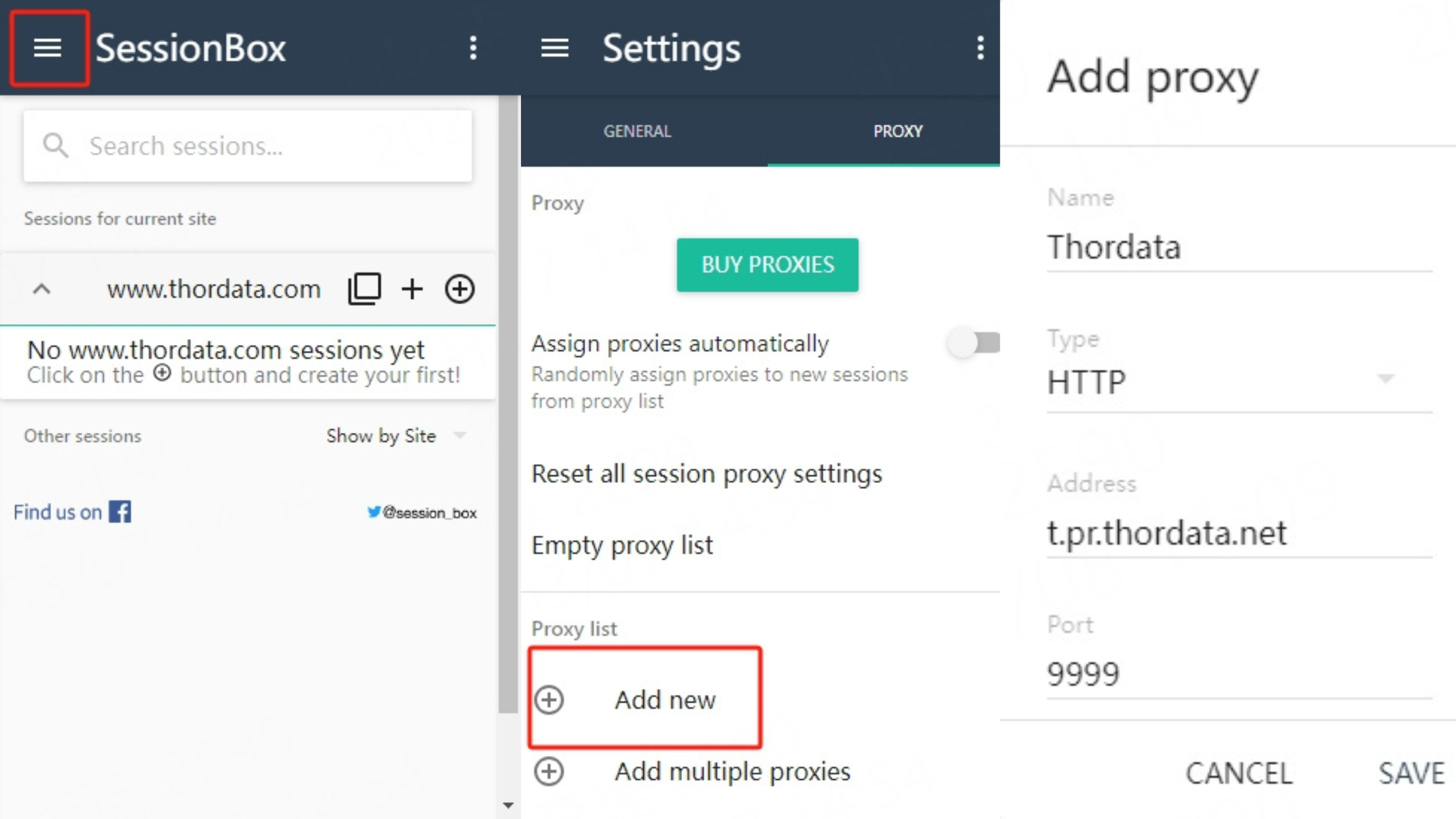
After installing SessionBox, click on the extension icon in your browser. Click on the three horizontal lines and select Settings.
Click on the PROXY option, then click Add new to create a proxy profile.
Enter any name you want.
In the Address and Port fields, input the IP address and port of your chosen proxy. For example, t.pr.thordata.net and 9999.
Once everything is set up, it’s time to test it. Open a session and use services like ipinfo.io to check if the proxy is working correctly. If it shows the proxy’s IP instead of your real IP, everything is working fine.
While the setup process is quite straightforward, some things might trip you up.
Proxy Not Connected: If the proxy isn’t connected, double-check your settings. Most likely, you entered the wrong IP or port. The fix is simple—just check the numbers carefully.
Slow Speeds: Proxies (especially free ones) can sometimes slow down your connection. If your proxy is lagging, consider upgrading to a premium service for better speed and reliability.
IP Blocked: Some websites may block proxy IPs, especially data center proxies. If you encounter this issue, try switching to residential proxies for a more “natural” IP.
Perhaps SessionBox isn’t for you. Or maybe you’re just curious about what other options are available. Regardless, there are several reliable alternatives to consider. Let’s take a look at the best options in 2025.
Multilogin is one of the top competitors in multi-account management. It’s a powerful tool that allows you to create different profiles and browse independently with multiple IPs, just like SessionBox. One of its main advantages is the ability to use advanced browser fingerprints, which helps avoid detection.
Pros:
More customization for browser profiles.
Supports real browser fingerprints to minimize detection.
Easy proxy usage.
Cons:
More expensive than SessionBox.
Slightly higher learning curve for beginners.
If you’re looking for a simplified experience, Ghost Browser is a great choice. It’s designed specifically for managing multiple accounts simultaneously and uses proxy settings to create isolated sessions. It’s particularly popular among marketers and social media managers.
Pros:
Clean interface, easy to use.
Built-in proxy support.
Suitable for team collaboration.
Cons:
Limited features in the free version.
May not be as flexible as SessionBox.
BrowserStack is another good option, especially for developers and testers. It allows you to test websites across multiple browsers and devices. Its features may not be as rich for personal use, but it’s a powerful tool for cross-platform testing.
Pros:
Excellent for developers and website testers.
Supports various devices and browsers.
Offers a range of proxy configuration locations.
Cons:
High cost for personal use.
More suited for development rather than everyday browsing.
Incogniton provides a flexible alternative to SessionBox, especially if privacy and anonymity are your top concerns. It allows users to create multiple profiles with different proxy settings, making it an excellent choice for managing numerous online accounts.
Pros:
Affordable pricing.
Supports various proxies.
Focuses on privacy and anonymity.
Cons:
More basic interface compared to other tools.
Speed may vary depending on the proxy used.
Whether you are configuring proxies in SessionBox or exploring alternatives, the goal is always to enhance your browsing experience—whether for privacy, convenience, or managing multiple accounts. SessionBox makes using proxies relatively simple, but if you’re looking for more powerful features or greater customization, there are plenty of alternatives worth considering, such as Multilogin, Ghost Browser, and BrowserStack.
Frequently asked questions
How does SessionBox work?
SessionBox allows users to manage multiple independent browsing sessions within a single browser window. Each session is isolated, meaning you can log into different accounts on the same website without interference.
Is there a limit on SessionBox?
SessionBox offers a free plan for non-commercial use, although this plan has some limitations, such as allowing a maximum of 10 local sessions to be created and maintaining only 5 active sessions simultaneously.
Is SessionBox safe?
SessionBox is generally considered safe because it isolates each session and provides an additional layer of security. However, this depends on how you configure it. If you use proxies through SessionBox, make sure to choose a reputable provider. Additionally, as with any online tool, you must be cautious about the data you share, especially when accessing sensitive accounts or websites.
About the author
Yulia is a dynamic content manager with extensive experience in social media, project management, and SEO content marketing. She is passionate about exploring new trends in technology and cybersecurity, especially in data privacy and encryption. In her free time, she enjoys relaxing with yoga and trying new dishes.
The thordata Blog offers all its content in its original form and solely for informational intent. We do not offer any guarantees regarding the information found on the thordata Blog or any external sites that it may direct you to. It is essential that you seek legal counsel and thoroughly examine the specific terms of service of any website before engaging in any scraping endeavors, or obtain a scraping permit if required.
 Looking for
Top-Tier Residential Proxies?您在寻找顶级高质量的住宅代理吗?
Looking for
Top-Tier Residential Proxies?您在寻找顶级高质量的住宅代理吗?
How to Scraping Dynamic Websites with Python?
In this article, learn how to ...
Anna Stankevičiūtė
2026-03-03

Scraping Yahoo Finance using Python
Xyla Huxley Last updated on 2026-03-02 10 min read […]
Unknown
2026-03-03

TCP Deep Dive with Wireshark
Xyla Huxley Last updated on 2026-03-03 6 min read TCP i […]
Unknown
2026-03-03

Web Scraping with Python using Requests
Xyla Huxley Last updated on 2026-03-03 6 min read Web c […]
Unknown
2026-03-03

Crawl4AI: Open-Source AI Web Crawler with MCP Automation
Xyla Huxley Last updated on 2026-03-03 10 min read AI a […]
Unknown
2026-03-03

Using Wget with Python: A Practical Guide for Reliable, Scalable Web Data Retrieval
Xyla Huxley Last updated on 2026-03-03 10 min read […]
Unknown
2026-03-03

How to Make HTTP Requests in Node.js With Fetch API (2026)
A practical 2026 guide to usin ...
Kael Odin
2026-03-03

How to Scrape Job Postings in 2026: Complete Guide
A 2026 end-to-end guide to scr ...
Kale Odin
2026-03-03

BeautifulSoup Tutorial 2026: Parse HTML Data With Python
A 2026 step-by-step BeautifulS ...
Kael Odin
2026-03-03
