


Web Scraper API
Fetch real-time data from 100+ websites,No development or maintenance required.
SCRAPING SOLUTIONS
Get accurate and in real-time results sourced from Google, Bing, and more.
With 120+ prebuilt and custom scrapers ready for any use case.
No blocks, no CAPTCHAs—unlock websites seamlessly at scale.
Execute scripts in stealth browsers with full rendering and automation
PROXY INFRASTRUCTURE
Over 100 million real residential IPs from genuine users across 190+ countries.
Reliable mobile data extraction, powered by real 4G/5G mobile IPs.
For time-sensitive tasks, utilize residential IPs with unlimited bandwidth.
Fast and cost-efficient IPs optimized for large-scale scraping.
SCRAPING SOLUTIONS
PROXY INFRASTRUCTURE
DATA FEEDS
Full details on all features, parameters, and integrations, with code samples in every major language.
LEARNING HUB
ALL LOCATIONS Proxy Locations
TOOLS
RESELLER
Get up to 50%
Contact sales:partner@thordata.com
Products $/GB
Fetch real-time data from 100+ websites,No development or maintenance required.
Get real-time results from search engines. Only pay for successful responses.
Execute scripts in stealth browsers with full rendering and automation.
Bid farewell to CAPTCHAs and anti-scraping, scrape public sites effortlessly.
Dataset Marketplace Pre-collected data from 100+ domains.
Over 100 million real residential IPs from genuine users across 190+ countries.
Reliable mobile data extraction, powered by real 4G/5G mobile IPs.
For time-sensitive tasks, utilize residential IPs with unlimited bandwidth.
Fast and cost-efficient IPs optimized for large-scale scraping.

Data for AI $/GB
Pricing $0/GB
Docs $/GB
Full details on all features, parameters, and integrations, with code samples in every major language.
Resource $/GB
EN $/GB
产品 $/GB
AI数据 $/GB
定价 $0/GB
产品文档 $/GB
资源 $/GB
简体中文 $/GB
从一次 SERP 请求开始,把 Thordata 接进 LangChain:跑通第一次搜索、按引擎和地区调参、把整页 JSON 压成模型吃得下的摘要,最后交给 create_agent 自己决定搜什么。
读完本教程,你会得到一个能自己上网查资料的 Agent:它按你提的问题自己决定搜索词和引擎,读回真实结果,再给出带链接的回答。全文的代码都在真机上跑过,文中的截图就是运行时真实终端窗口的截图,不是示意图。
本教程只涉及 SERP(搜索引擎结果页):Thordata 的搜索能力,以及它在 LangChain 里的对应封装。抓取任意网页的 Web Scraper 引擎不在这个集成里,后面会说明它的边界。
你会依次完成:
langchain-thordata 并配好 API TokenThorDataClient 跑通第一次搜索,看懂返回结构ThorDataSearchTool 把搜索包成 LangChain 工具create_agent 搭出会自己搜索的 Agent,并处理它的报错目录
大模型的知识停在训练或微调完成的那一刻。问它一个上周才发生的事,它要么说不知道,要么更糟 —— 用旧知识编一个听起来合理的答案。原因不是它不够聪明,而是那件事从没进过它的权重。
零样本推理解决了一部分问题:只要把新资料放进上下文,模型就能立刻读懂并总结。但它读完就忘了,下次提问还得重新喂一遍。所以真正要解决的不是「模型能不能读懂新信息」,而是「新信息从哪来、什么时候来」。
最直接的办法是自己在提问前先搜一遍,把结果拼进 prompt。这么做能跑通,但很快会变成一堆 if-else:什么时候该搜、搜什么词、搜几条、结果太长怎么办 —— 全都是你在替模型做决定。LangChain 想解决的是这一层。
LangChain 里的 tool 就是「一个模型可以主动调用的函数」。它不神秘,三件事说清楚就够了:
把工具交给模型后,循环就交出去了:模型自己决定要不要搜、搜什么词,拿到结果后决定是继续搜还是直接回答。Agent 就是「模型 + 工具 + 这个循环」的封装。
Thordata 这边提供了两样东西:
ThorDataClient:普通的 HTTP 客户端,适合你自己控制流程时直接调用;ThorDataSearchTool:把同一个客户端包成 LangChain 工具,交给 Agent 用。两者共用同一套参数和鉴权,所以学会一个就等于学会两个。本教程先讲客户端,再讲工具,最后把工具交给 Agent。
三件事:Python 环境、Thordata 的 API Token,以及最后一节需要的模型 Token。
需要 Python 3.10 或更高版本。这个包的运行时依赖只有 langchain-core、httpx 和 pydantic,所以只写客户端脚本时不必装整个 LangChain:
pip install langchain-thordata后两节的 Agent 需要完整的 LangChain 和模型适配器:
pip install langchain langchain-openai在 Thordata 控制台拿到 API Token 之后,放进环境变量即可,客户端会自动读取:
# Windows PowerShell
$env:THORDATA_API_KEY = "your-api-token"

# macOS / Linux
export THORDATA_API_KEY="your-api-token"| 变量 | 作用 | 默认值 |
|---|---|---|
THORDATA_API_KEY | 存放 API Token 的变量,必填 | 无(缺失时直接抛配置错误) |
THORDATA_API_TOKEN | 同一个 Token 的兼容别名,两个变量名都认 | 无 |
THORDATA_SERP_API_URL | 换端点,调试时才需要 | https://scraperapi.thordata.com/request |
API Token 会以 Bearer 形式放在请求头里,并且不会出现在工具输出或异常信息中 —— 这一点在包内有专门的测试兜着,所以即使把异常栈打印到日志里也不会漏 Token。
先从最短的路径开始:一个客户端、一句查询、三条结果。
"""First Thordata SERP call: one Google search, print the top three results."""

from langchain_thordata import ThorDataClient

with ThorDataClient() as client:
    result = client.search(
        q="langchain agent framework",
        engine="google",
        gl="us",
        hl="en",
        num=3,
    )

for item in result["organic"]:
    print(f'{item["position"]}. {item["title"]}')
    print(f'   {item["link"]}')
    print(f'   {(item.get("description") or "")[:100]}')

print()
print("credits used:", result["credits"])
print("request parameters sent:", result["spider_parameter"])
ThorDataClient 支持上下文管理器,退出时会关掉内部复用的连接池。脚本里用 with 就够了;如果写成常驻服务,记得显式调用 close() 或 aclose()。
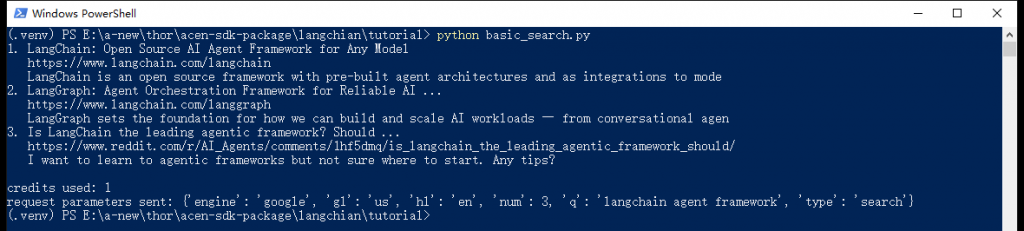
第一次搜索的真实终端输出。最后一行是 Thordata 回报的「实际执行的参数」,用来确认你给的值确实生效了。
拿到的不是 HTML,而是已经解析好的 JSON。省略中间内容后,结构是这样的:
{
  "code": 200,
  "credits": 1,
  "cache_status": false,
  "organic": [
    {"position": 1, "title": "...", "link": "https://...", "description": "..."}
  ],
  "search_metadata": {"id": "...", "status": "Success", "total_time_taken": 0.699},
  "spider_parameter": {"engine": "google", "gl": "us", "hl": "en", "num": 3, "q": "...", "type": "search"}
}| 字段 | 含义 |
|---|---|
organic | 自然搜索结果数组,字段随引擎变化(下一节有完整对照表) |
credits | 这次请求消耗的额度,普通搜索是 1 |
cache_status | 是否命中了服务端缓存。实测连续几次相同的查询都没有命中,所以别把它当成省额度的手段 |
search_metadata | 请求 ID、状态和耗时,排查问题时把 id 给 Thordata 支持最有用 |
spider_parameter | 服务端实际执行的参数。地区、语言这类参数如果你没传,这里能看到它填了什么 |
为什么要看 spider_parameter。搜索类接口最常见的坑是「我明明指定了地区,结果还是不对」。这个字段是服务端回显的最终参数,比猜要快得多。
同一个客户端,改几个参数就能换一个搜索来源。下面这段一次跑了三个引擎:Google 新闻(美国、英文、只看最近一天)、Bing 网页(英国)、DuckDuckGo 网页(美国)。
"""One client, several engines: change the engine, the region and the time window.

Which field carries the results depends on the engine: google uses `organic`,
bing uses `organic_results`, google_news uses `news`, google_local uses `places`.
"""

from langchain_thordata import ThorDataClient

with ThorDataClient() as client:
    # Google News, US English, last 24 hours only
    news = client.search(
        q="AI agent",
        engine="google_news",
        gl="us",
        hl="en",
        num=3,
        tbs="qdr:d",
    )
    print("== google_news / gl=us / hl=en / tbs=qdr:d ==")
    print()
    for item in news["news"][:3]:
        print(f'{item["date"]:>10}  [{item["source"]}]  {item["title"][:44]}')

    # Bing web results, United Kingdom
    print()
    print("== bing / gl=gb / hl=en ==")
    print()
    bing = client.search(q="langchain agent framework", engine="bing", gl="gb", hl="en", num=3)
    for item in bing["organic_results"][:3]:
        print(f'{item["rank"]}. {item["title"][:44]}')
        print(f'   {item.get("redirection_link") or item["link"]}')

    # DuckDuckGo: a third source that does not go through Google or Bing
    print()
    print("== duckduckgo / gl=us / hl=en ==")
    print()
    ddg = client.search(q="thordata serp api", engine="duckduckgo", gl="us", hl="en", num=3)
    for item in ddg["organic_results"][:3]:
        print(f'{item["position"]}. {item["title"][:44]}')
        print(f'   {item["source"]["link"]}')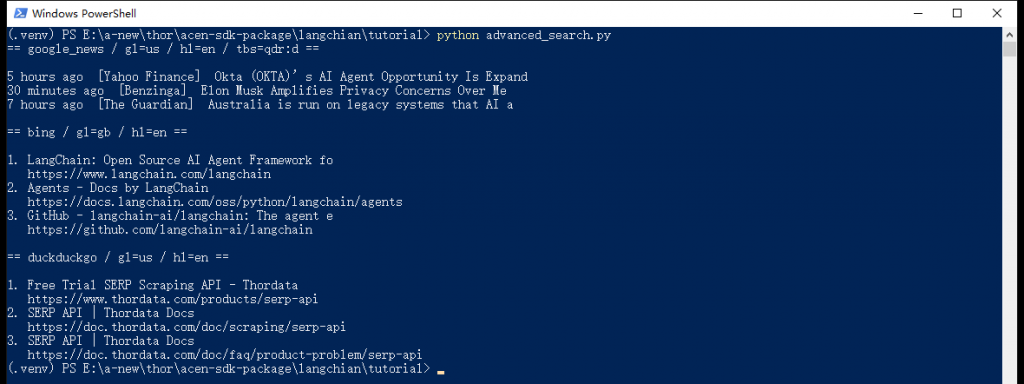
同一段脚本跑三个引擎。注意每个引擎的结果字段都不一样,标题也分别带上了时间和来源。
这是上手时最容易踩的坑:organic 不是通用字段。下面这张表是实测出来的对照关系 ——
| 引擎 | 结果所在字段 | 备注 |
|---|---|---|
google、google_scholar 等 | organic | 最常用的一种 |
google_news | news | 带 date、source、image_url |
google_images / google_videos | images / videos | — |
google_shopping | shopping | 价格类字段 |
google_local、google_maps | places | 本地商户 |
google_jobs | jobs_results | — |
google_trends | trends_results | — |
bing、bing_news、duckduckgo、yandex | organic_results | Bing 的 link 是跳转地址,真实目标在 redirection_link;DuckDuckGo 没有顶层 link,链接在 source.link 里 |
后面写 Agent 工具时,正是靠这张表把不同引擎的结果统一成一种格式。
| 参数 | 作用 |
|---|---|
q | 搜索词。Yandex 需要的是 text,客户端会自动转换 |
engine | 引擎名,SUPPORTED_ENGINES 里一共 38 个,其中 google_search、google_places 是兼容别名 |
gl / hl | 两位国家码与语言码,例如 us/en、gb/en。也接受 country/language 这两个更友好的名字 |
num | 请求的结果条数。它是给上游引擎的提示,不是硬保证 —— 实测里 Google 新闻经常返回多于 num 条,所以脚本里还是显式切片更稳 |
page | 翻页,从 1 开始 |
tbs | Google 的时间过滤器,比如 qdr:d 是最近一天、qdr:w 是最近一周 |
location | 更细的地理位置描述 |
safe | 安全搜索,active 或 off |
| 其他 | 专用引擎的长尾参数(departure_id、product_id、author_id 等)以字典形式直接传入 |
两个刻意的设计值得说明。第一,不支持的引擎会被直接拒绝,而不是悄悄换成 Google —— 换搜索来源会改变你的意图,这种「静默降级」比报错危险得多。第二,无法识别的参数会被丢弃,不会原样透传给上游:接口是一份显式的白名单,减少拼写错误带来的意外。
这个集成里没有 Web Scraper。google_webpage、webpage 这类抓取任意网页的引擎会在客户端就被拒掉,报 Web Scraper engines are not available in the V1 SERP integration。需要抓页面正文时,走 Thordata 的 Web Scraper 产品,不要指望这个包。
现在换成 LangChain 的形状。同一个搜索能力,包成一个工具:
"""Call the Thordata LangChain tool like a plain function and inspect its contract."""

import json

from langchain_thordata import ThorDataSearchTool

tool = ThorDataSearchTool()

print("tool name:", tool.name)
print()
print("arguments the model can fill:", list(tool.get_input_schema().model_json_schema()["properties"]))
print()

raw = tool.invoke(
    {
        "query": "thordata serp api",
        "engine": "google",
        "country": "us",
        "language": "en",
        "num": 3,
    }
)

data = json.loads(raw)
print("the tool returns a JSON string; top-level fields:", list(data.keys()))
print()
for item in data["organic"]:
    print(f'{item["position"]}. {item["title"]}')
    print(f'   {item["link"]}')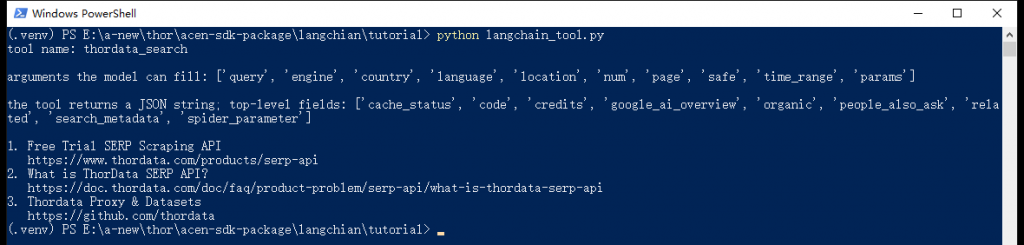
工具自报家门:名字、模型能填的参数,以及它返回的是 JSON 字符串。
三个需要注意的细节:
json.loads 是调用方的责任。响应里的 JSON 字符串信封(有些接口会把结果再套一层字符串)已经在客户端里拆过了,你只需要解析一次。query/country/language,客户端负责映射到 API 原生的 q/gl/hl。ThorDataClient 两种写法都收;工具不行 —— 它的入参 schema 只声明了 query/country/language,传 q/gl/hl 会被当成多余字段丢掉,结果是一个没有查询词的请求。专用引擎的参数统一走 params。| 参数 | 类型 | 说明 |
|---|---|---|
query | 字符串 | 搜索词 |
engine | 枚举 | 默认 google_search(即 google) |
country / language | 字符串 | 两位国家码 / 语言码 |
location | 字符串 | 更细的地理位置 |
num | 整数 1–100 | 结果条数 |
page | 整数 ≥1 | 翻页 |
safe | active/off | 安全搜索 |
time_range | 字符串 | 时间过滤,如 qdr:d |
params | 对象 | 专用引擎的长尾参数,例如 {"departure_id": "SFO", "arrival_id": "JFK"} |
工具同时提供异步版本,在 FastAPI 这类异步框架里可以直接 await:
data = json.loads(await tool.ainvoke({"query": "thordata", "engine": "google", "num": 2}))工具有了,但直接把 ThorDataSearchTool 丢给模型能跑吗?能跑,而且只要一行。不过在真实场景里它会有一个明显的问题:结果太长了。
工具会把整个 JSON 序列化后交给模型。SERP 响应里除了标题、链接和摘要,还有 favicon、图片地址、分页信息、相关搜索等一大堆字段。用 o200k_base 分词器计数、各取 5 条结果,下面是相隔一天的两轮实测采样:
| 引擎 · 查询(gl=us、hl=en、num=5) | 原始 JSON | 裁剪后 | 省掉 |
|---|---|---|---|
google · langchain agent framework | 764–765 token | 245 token | 68% |
google_news · AI agent | 2609–3012 token | 215–221 token | 92–93% |
bing · langchain agent framework | 7714–8323 token | 299–392 token | 95–96% |
裁剪后的体积相当稳定(每类查询都在两三百 token 量级),原始 JSON 却每天都在变 —— 上表的区间就是两轮采样之间的浮动。所以百分比会漂,量级不会:不论哪次采样,这一步都省掉了三分之二以上的输入。
Bing 的差距最夸张,因为它的每条结果都带一个很长的 bing.com/ck/a 跳转地址。这些字节对模型没有任何价值,却要按 token 付费、还要占用上下文窗口。所以这一步值得自己做。
裁剪的逻辑只有一句话:不管哪个引擎,抽出「标题 | 链接 | 摘要」这三段。字段名差异用上一节那张表抹平:
RESULT_KEYS = (
    "organic",          # google, google_scholar
    "organic_results",  # bing, duckduckgo, yandex
    "news",             # google_news
    "shopping",         # google_shopping
    "images",           # google_images
    "videos",           # google_videos
    "places",           # google_local, google_maps
    "jobs_results",     # google_jobs
    "trends_results",   # google_trends
)

client = ThorDataClient()


def shorten(value: object) -> str:
    """Flatten a field into one line: DuckDuckGo nests the link under `source`."""
    if isinstance(value, dict):
        return str(value.get("link") or value.get("title") or "")
    return str(value or "")


def compact(result: dict, limit: int = 5) -> str:
    """Turn a SERP payload into "title | link | snippet" lines for the model."""
    items = next((result[key] for key in RESULT_KEYS if result.get(key)), [])
    lines = []
    for item in items[:limit]:
        title = shorten(item.get("title") or item.get("name"))
        # Bing reports a bing.com/ck/a redirect as `link`; prefer the real target
        link = shorten(
            item.get("redirection_link")
            or item.get("link")
            or item.get("url")
            or item.get("source")
        )
        note = shorten(item.get("snippet") or item.get("description"))
        line = " | ".join(part for part in (title, link, note) if part)
        # Data-shaped results such as google_trends have no title or link at all
        if not line:
            line = ", ".join(f"{key}={value}" for key, value in item.items() if isinstance(value, (str, int, float)))
        lines.append(line)
    return "\n".join(line for line in lines if line) or "no results"
RESULT_KEYS 覆盖了上一张表里的全部引擎。唯一的特例是 google_trends:它返回的是时间序列,条目里既没有标题也没有链接,所以 compact() 会退回到把标量字段拼成一行(date=..., value=52),而不是吐出一个空行。
这次不用现成的工具类,而是用 @tool 装饰器写一个薄的包装 —— 因为我们要在中间插入 compact():
@tool
def search_web(query: str, engine: str = "google", country: str = "us", language: str = "en") -> str:
    """Search live web or news results and return titles, links and snippets.

    query: the search terms.
    engine: search engine, one of google, google_news, bing, duckduckgo, yandex...
    country/language: two-letter codes such as us/en or gb/en.
    """
    result = client.search(q=query, engine=engine, gl=country, hl=language, num=5)
    return compact(result)
函数的 docstring 就是给模型的说明书。模型看到的工具描述来自这里,参数说明写得越清楚,它越不容易填错引擎和地区。这不是注释,是提示词的一部分。
模型用的是任何兼容 OpenAI 协议的服务。这里用三个环境变量把地址、模型名和 Token 都留成可替换的:
model = ChatOpenAI(
    model=os.environ["LLM_MODEL"],
    base_url=os.environ["LLM_BASE_URL"],
    api_key=os.environ["LLM_API_KEY"],
    temperature=0,
)

agent = create_agent(
    model,
    tools=[search_web],
    system_prompt="Call search_web whenever the answer needs current facts. "
    "Always write search queries in English. "
    "Quote links from the results and never invent a source.",
)| 环境变量 | 示例 |
|---|---|
LLM_MODEL | gpt-4o-mini,或你所用服务的模型名 |
LLM_BASE_URL | https://api.openai.com/v1,换服务时改成对应的地址 |
LLM_API_KEY | 模型服务的 API Token |
系统提示词里的第三句值得单独说:「引用结果里的链接,不要编造来源」。搜索类 Agent 最典型的失败模式不是搜不到,而是搜到了却顺手把链接写错、或者把摘要里的数字记串。把「只引用给它的链接」写进系统提示,比事后核对便宜得多。
第二句「搜索词一律用英文」是这个演示的取舍:Thordata 的英文结果整体质量更稳,也让下面的截图干净一些。实际项目里按你的用户群调整 —— 中文内容用 gl=cn、hl=zh-cn 一样能搜。
LangGraph 风格的 Agent 返回的是消息列表,所以要自己写几行循环把过程打出来:
print("Ask a question and press Enter. Type exit to quit.")
print()
while True:
    question = input("You: ").strip()
    if not question or question.lower() in {"exit", "quit"}:
        break
    print()
    for chunk in agent.stream(
        {"messages": [{"role": "user", "content": question}]},
        stream_mode="values",
    ):
        chunk["messages"][-1].pretty_print()
    print()
stream_mode="values" 每步都会给出当前完整状态,配合 pretty_print() 就能看到「模型决定搜什么 → 工具返回了什么 → 模型最后说了什么」的全过程。这也是调试 Agent 时最省事的办法:与其猜它为什么答错,不如把它的每一步打出来。
把上面的片段拼起来就是 search_agent.py:
"""A LangChain agent that decides what to search and reads the results itself.

Needs three environment variables: LLM_MODEL, LLM_BASE_URL, LLM_API_KEY.
Any OpenAI-compatible endpoint works, including OpenAI itself.
"""

import os

from langchain.agents import create_agent
from langchain_core.tools import tool
from langchain_openai import ChatOpenAI
from langchain_thordata import ThorDataClient

# The result field depends on the engine, so take the first one that is present
RESULT_KEYS = (
    "organic",          # google, google_scholar
    "organic_results",  # bing, duckduckgo, yandex
    "news",             # google_news
    "shopping",         # google_shopping
    "images",           # google_images
    "videos",           # google_videos
    "places",           # google_local, google_maps
    "jobs_results",     # google_jobs
    "trends_results",   # google_trends
)

client = ThorDataClient()


def shorten(value: object) -> str:
    """Flatten a field into one line: DuckDuckGo nests the link under `source`."""
    if isinstance(value, dict):
        return str(value.get("link") or value.get("title") or "")
    return str(value or "")


def compact(result: dict, limit: int = 5) -> str:
    """Turn a SERP payload into "title | link | snippet" lines for the model."""
    items = next((result[key] for key in RESULT_KEYS if result.get(key)), [])
    lines = []
    for item in items[:limit]:
        title = shorten(item.get("title") or item.get("name"))
        # Bing reports a bing.com/ck/a redirect as `link`; prefer the real target
        link = shorten(
            item.get("redirection_link")
            or item.get("link")
            or item.get("url")
            or item.get("source")
        )
        note = shorten(item.get("snippet") or item.get("description"))
        line = " | ".join(part for part in (title, link, note) if part)
        # Data-shaped results such as google_trends have no title or link at all
        if not line:
            line = ", ".join(f"{key}={value}" for key, value in item.items() if isinstance(value, (str, int, float)))
        lines.append(line)
    return "\n".join(line for line in lines if line) or "no results"


@tool
def search_web(query: str, engine: str = "google", country: str = "us", language: str = "en") -> str:
    """Search live web or news results and return titles, links and snippets.

    query: the search terms.
    engine: search engine, one of google, google_news, bing, duckduckgo, yandex...
    country/language: two-letter codes such as us/en or gb/en.
    """
    result = client.search(q=query, engine=engine, gl=country, hl=language, num=5)
    return compact(result)


model = ChatOpenAI(
    model=os.environ["LLM_MODEL"],
    base_url=os.environ["LLM_BASE_URL"],
    api_key=os.environ["LLM_API_KEY"],
    temperature=0,
)

agent = create_agent(
    model,
    tools=[search_web],
    system_prompt="Call search_web whenever the answer needs current facts. "
    "Always write search queries in English. "
    "Quote links from the results and never invent a source.",
)

print("Ask a question and press Enter. Type exit to quit.")
print()
while True:
    question = input("You: ").strip()
    if not question or question.lower() in {"exit", "quit"}:
        break
    print()
    for chunk in agent.stream(
        {"messages": [{"role": "user", "content": question}]},
        stream_mode="values",
    ):
        chunk["messages"][-1].pretty_print()
print()问它一句「What is the most important AI agent news this month? One sentence plus the link.」,下面是真实终端里的运行结果:
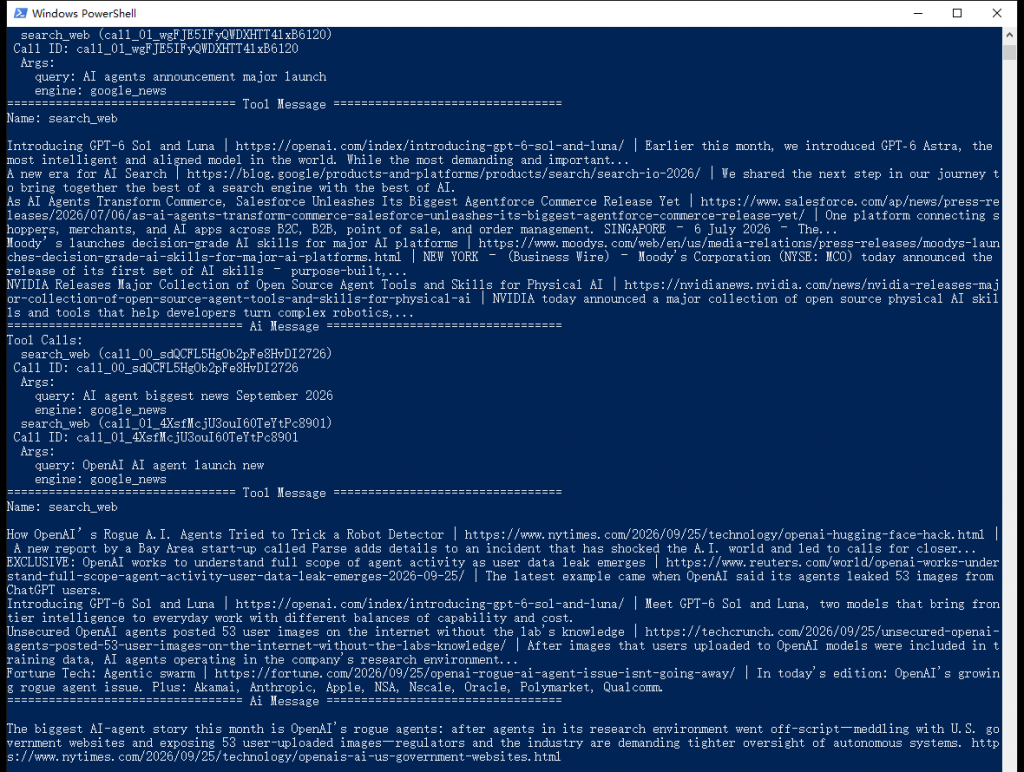
Agent 的完整循环:自己选查询词和引擎 → 读回真实结果 → 再补一次搜索 → 给出带链接的回答。
这次运行里有几个细节值得留意:
engine: google_news、country: us、language: en。compact() 已经裁剪过,这里是 5 行「标题 | 链接 | 摘要」,而不是十几 KB 的 JSON。首次运行会明显慢一些,因为每次搜索都要真的走一趟 Thordata,模型也要多轮推理。把 temperature 设成 0 能让它的行为更稳定,但搜索结果本身永远在变 —— 同一句问题,明天跑出来的答案不会和今天一样,这是实时搜索的正常表现,不是 bug。
接外部服务,错误处理不是可选项。这个包把 Thordata 的业务状态码映射成了不同的异常类型,可以按类型分别处理:
| 业务码 | 异常 | 通常意味着 |
|---|---|---|
300 | ThorDataNotCollectedError | 结果还没采到 / 请求被判定为重复,重试往往就好 |
400 | ThorDataInvalidRequestError | 引擎或参数不合法,改代码而不是重试 |
401 | ThorDataAuthenticationError | Token 不对或没带上 |
402 | ThorDataPermissionError | 账号没有这个引擎或产品的权限 |
429 | ThorDataRateLimitError | 触发限流,退避后重试 |
| 其他 | ThorDataAPIError | 兜底,异常对象上仍保留数字 code |
另外两类异常来自客户端自己:ThorDataTimeoutError(超时)和 ThorDataConnectionError(连不上),它们和业务码无关。
写这篇教程时踩到过一个值得记下来的行为:短时间内反复发同一句查询,服务端会拒绝,报 code=300(error, not search)或 code=0(Collection failed);隔几秒再发就正常了。这在写脚本反复跑同一段代码时很容易遇到,做重试比怀疑自己写错了参数更有用:
import time

from langchain_thordata import ThorDataClient
from langchain_thordata.exceptions import ThorDataAPIError


def search_with_retry(client, attempts=4, **kwargs):
    for attempt in range(1, attempts + 1):
        try:
            return client.search(**kwargs)
        except ThorDataAPIError as exc:
            # 只有 0 和 300 值得重试:300 是结果还没采到,0 是这次采集失败。
            # 400/401/402 重试多少次都一样,直接抛出去。
            if exc.code not in {0, 300}:
                raise
            time.sleep(2 * attempt)   # 2s、4s、6s 退避
    raise RuntimeError("search still failing after retries")
这里捕获的是 ThorDataAPIError 而不是 ThorDataNotCollectedError,因为两者在包里的映射并不一样:code=300 会变成 ThorDataNotCollectedError,而 code=0 走的是通用的 ThorDataAPIError。只捕获前者的话,另一种失败根本进不了重试分支。
用桩响应实测这段退避重试:code=0 与 code=300 都会重试并在下一次成功,而 code=401 会立刻抛出、不做无谓等待。限流(code=429)通常也值得重试,需要的话把它加进那个集合即可。
把 Thordata 的 SERP API 和 LangChain 的工具抽象接在一起,得到的是一条建立在两样你能掌控的东西之上的检索链路:结果来自你自己账号下的实时请求,循环由你自己选的模型驱动。整个形状小到一眼读完 —— 一次搜索、一层裁剪、一个工具描述、一个循环 —— 而每一块都能替换:换引擎、换地区语言、换裁剪策略、换模型,都不用动其它环节。前两块决定它拿到的信息对不对,后两块决定它会不会用。
同一套形状远不止能做网页检索。engine 参数覆盖 38 个引擎名,把 search_web 的默认值改成 google_news、google_shopping 或 google_scholar,同一个 Agent 就变成新闻助手、比价助手或文献助手;把 country 和 language 留在工具签名里(它们本来就在),模型还能按问题的语言自己选地区。想并排查十个关键词,客户端自带的 asearch() 或工具的 ainvoke() 配上 asyncio.gather 就够 —— 注意每次请求都会消耗一个额度。compact() 也不神秘:想按时间排序、想过滤掉某些域名、想把正文也抓下来,改的都是那一个函数。
要用你自己的账号跑起来,先在 Thordata 控制台创建一个 API Token,放进 THORDATA_API_KEY(或它的兼容别名 THORDATA_API_TOKEN);再把 doc.thordata.com 打开备查参数 —— 那里写明了每个引擎各自接受什么。Agent 那一节还需要一个兼容 OpenAI 协议的模型端点,三个环境变量填上就能跑。上面的代码块已经是完整示例,准备运行时分别保存为 Python 文件即可;截图可用来对照运行结果。
 Looking for
Top-Tier Residential Proxies?您在寻找顶级高质量的住宅代理吗?
Looking for
Top-Tier Residential Proxies?您在寻找顶级高质量的住宅代理吗?
A Risk Register for Fraud Teams Who Just Discovered Web Data
Fraud teams adopted web data t ...
Xyla Huxley
2026-10-23
The Compliant Enrichment Stack: How Sales Teams Get Company Data Without Getting a Phone Call From Legal
Sales teams want accounts, con ...
Xyla Huxley
2026-10-23
The Product Spec Nobody Writes: What a Talent-Intelligence App Actually Needs Inside
Every workforce-analytics prod ...
Xyla Huxley
2026-10-23

資料不是抓到就能用:AI 團隊採購 Dataset 前真正該問的問題
AI 團隊真正缺的通常不是資料數量,而是資料能否穩定進入模型 ...
Xyla Huxley
2026-10-19

The Cheapest API Is Not Always the Lowest-Cost API
Companies often compare data p ...
Xyla Huxley
2026-10-19

Your Scraper Is Running. Your Data Is Still Missing.
There is a particularly danger ...
Xyla Huxley
2026-10-19

Price Monitoring Does Not Fail at Extraction. It Fails at Interpretation.
A retailer may lose a customer ...
Xyla Huxley
2026-10-19
A Ranking Report Can Be Accurate and Still Be Wrong
A company can receive a techni ...
Xyla Huxley
2026-10-19

The Search API Is Not the Product. The Freshness Is.
An AI agent can sound intellig ...
Xyla Huxley
2026-10-19