


Web Scraper API
Fetch real-time data from 100+ websites,No development or maintenance required.
SCRAPING SOLUTIONS
Get accurate and in real-time results sourced from Google, Bing, and more.
With 120+ prebuilt and custom scrapers ready for any use case.
No blocks, no CAPTCHAs—unlock websites seamlessly at scale.
Execute scripts in stealth browsers with full rendering and automation
PROXY INFRASTRUCTURE
Over 100 million real residential IPs from genuine users across 190+ countries.
Reliable mobile data extraction, powered by real 4G/5G mobile IPs.
For time-sensitive tasks, utilize residential IPs with unlimited bandwidth.
Fast and cost-efficient IPs optimized for large-scale scraping.
SCRAPING SOLUTIONS
PROXY INFRASTRUCTURE
DATA FEEDS
Full details on all features, parameters, and integrations, with code samples in every major language.
LEARNING HUB
ALL LOCATIONS Proxy Locations
TOOLS
RESELLER
Get up to 50%
Contact sales:partner@thordata.com
Products $/GB
Fetch real-time data from 100+ websites,No development or maintenance required.
Get real-time results from search engines. Only pay for successful responses.
Execute scripts in stealth browsers with full rendering and automation.
Bid farewell to CAPTCHAs and anti-scraping, scrape public sites effortlessly.
Dataset Marketplace Pre-collected data from 100+ domains.
Over 100 million real residential IPs from genuine users across 190+ countries.
Reliable mobile data extraction, powered by real 4G/5G mobile IPs.
For time-sensitive tasks, utilize residential IPs with unlimited bandwidth.
Fast and cost-efficient IPs optimized for large-scale scraping.

Data for AI $/GB
Pricing $0/GB
Docs $/GB
Full details on all features, parameters, and integrations, with code samples in every major language.
Resource $/GB
EN $/GB
产品 $/GB
AI数据 $/GB
定价 $0/GB
产品文档 $/GB
资源 $/GB
简体中文 $/GB
Running multiple social media accounts is no longer a niche tactic — it is standard practice for agencies, media buyers, affiliate marketers, and e-commerce operators worldwide. A digital marketing agency manages dozens of Instagram profiles across client brands. An advertiser distributes ad spend across separate Facebook accounts to reduce risk and test creative. A lead generation team operates multiple LinkedIn profiles to scale outreach without hitting daily limits.
But every major platform actively detects and penalizes multi-accounting. Facebook links accounts by IP address and browser fingerprint. Instagram flags devices managing more than five profiles. TikTok tracks device IDs and SIM data. LinkedIn rate-limits connection requests and bans automation signatures.
The difference between operators who scale successfully and those who lose accounts in waves comes down to infrastructure. This guide covers the three pillars of safe multi-account management — proxy configuration, browser isolation, and account quality — then walks through platform-specific setup for Facebook, Instagram, TikTok, LinkedIn, and Reddit.
Why Businesses Run Multiple Social Media Accounts
Before diving into the technical setup, it helps to understand the legitimate business reasons behind multi-accounting, because your infrastructure choices should match your specific use case.
Advertising risk distribution. A media buyer running $50,000 per month in Facebook Ads across a single account faces catastrophic risk if that account gets restricted. Distributing the same budget across ten accounts means a single restriction only affects 10% of spend. This is the most common reason advertisers maintain multiple Facebook ad accounts, and it applies equally to TikTok Ads and Google Ads.
Client and brand separation. Agencies managing social media for multiple clients need isolated accounts for each brand. Cross-contamination between client profiles — through shared cookies, cached logins, or IP overlap — creates both security and branding risks.
Geographic targeting. Operators managing campaigns across different countries need accounts that match local markets. A USA-based Facebook account performs differently in the Facebook algorithm than one created in Southeast Asia. Regional accounts with local IP histories generate better engagement and lower ad costs in their target markets.
A/B testing and audience segmentation. Running the same offer through different accounts — each with a different creative angle, audience, or landing page — provides more reliable split test data than running everything through a single ad account.
Outreach and lead generation. On LinkedIn, daily connection request limits cap individual outreach volume at roughly 80–100 requests per week for a mature account. Teams running outbound sales campaigns at scale need multiple profiles, each with its own connection history and messaging cadence, to maintain volume without triggering rate limits.
How Platforms Detect Multiple Accounts
Understanding detection is the foundation of prevention. Platforms use several layers of identification, and getting caught on any single layer can trigger a cascade of account bans.
IP address correlation. The most basic detection method. When multiple accounts log in from the same IP address within a short time window, platforms flag them as related. This is why a VPN is not sufficient — VPN IPs are shared among thousands of users and are frequently blacklisted by major platforms. Datacenter IPs are even worse; Facebook and Instagram maintain databases of known datacenter IP ranges and will immediately challenge or restrict accounts logging in from them.
Residential proxies solve this problem by routing each account’s traffic through a real IP address assigned by an ISP to an actual household. Platforms cannot distinguish this traffic from a regular user browsing from home. For multi-account management, residential proxies are the baseline requirement — each account should be assigned its own residential IP from the correct geographic region.
Browser fingerprinting. Even with unique IPs, platforms collect dozens of data points from your browser to build a device fingerprint: screen resolution, installed fonts, WebGL rendering characteristics, canvas fingerprint, timezone, language settings, browser plugins, and audio context. When two accounts share an identical fingerprint, the platform links them regardless of IP.
This is why regular Chrome profiles or incognito mode do not work for multi-accounting. Each browser session needs a unique, internally consistent fingerprint — a combination of hardware and software signals that mimics a real, distinct device.
Cookie and session data. Logging into Account A, then switching to Account B in the same browser leaves cookie traces that platforms detect. Even clearing cookies is not enough — platforms use cross-session tracking through IndexedDB, localStorage, and cached service workers.
Behavioral patterns. Platforms analyze login timing, posting patterns, engagement behavior, and interaction velocity. Twenty accounts that all log in at 9:00 AM, post at 9:15 AM, and go idle at 5:00 PM create an obvious pattern. Natural-looking activity across accounts requires staggered timing and varied behavior.
Phone number and email linkage. Accounts verified with the same phone number or created with emails from the same domain are trivially linked. Each account needs an independently verified phone number and a unique email address.
The Three Pillars of Multi-Account Infrastructure
Every successful multi-account operation runs on three components working together. Weakening any single pillar compromises the entire setup.
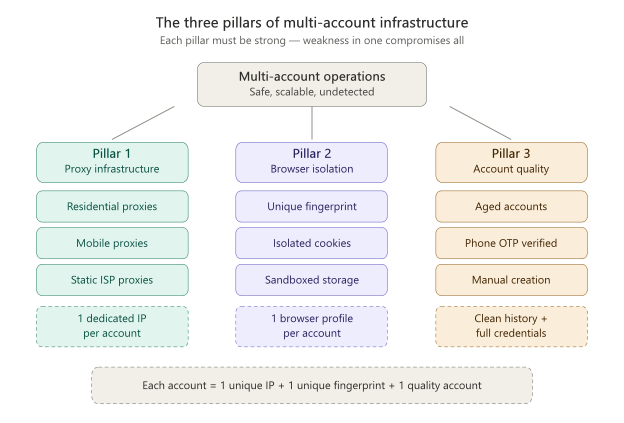
Caption: The three pillars of multi-account infrastructure — each account needs its own unique IP, unique browser fingerprint, and quality account credentials to appear as a genuine independent user.
Pillar 1: Proxy Infrastructure
Each account needs its own dedicated IP address from a residential proxy pool. The proxy must match the geographic region of the account — a USA-created Facebook account should log in through a USA residential IP, not a European one.
Proxy type selection matters. Residential rotating proxies are ideal for accounts that log in periodically — social media management, posting, engagement. For accounts that need persistent sessions — like Facebook Ads accounts that maintain long login sessions for campaign management — static ISP proxies provide a fixed residential IP that does not change between sessions. Mobile proxies, which use real 4G/5G IP addresses from carrier networks, are the most trusted proxy type for platforms like TikTok and Instagram that were designed primarily for mobile use.
The proxy pool size also matters. Providers with larger pools — Thordata operates over 100 million residential IPs across 190+ countries — offer better IP diversity and lower reuse rates. An IP that has been flagged by Facebook due to a previous user’s abuse will carry that reputation to your account. Larger pools mean cleaner IPs.
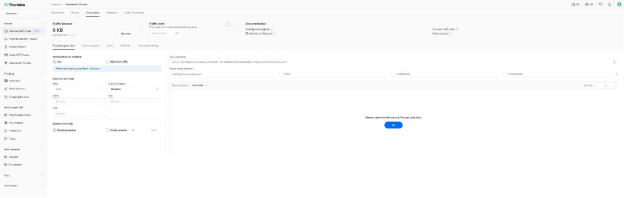
Caption: Thordata’s residential proxy dashboard — configure country targeting, session type (rotating or sticky), and authentication method for each proxy endpoint.
Configuration basics. Set up each proxy as a dedicated endpoint assigned to one account. Never share proxy endpoints between accounts. Most proxy providers support username-password authentication with country and session targeting, which means you can lock a specific residential IP to a specific browser profile.
Pillar 2: Browser Isolation
An antidetect browser creates isolated browser profiles, each with a unique fingerprint. Every profile operates in its own sandbox — separate cookies, separate cache, separate localStorage, separate fingerprint parameters.
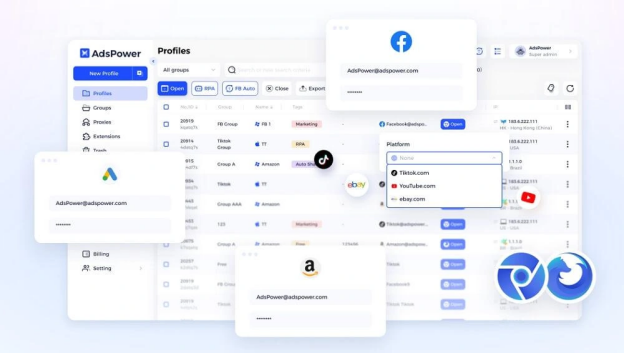
Caption: An antidetect browser managing multiple isolated profiles — each profile has its own proxy assignment, platform tag, and unique fingerprint to prevent cross-account detection.
Several antidetect browsers are available in the market, including options for both team and solo use. When choosing one, prioritize these features for multi-accounting:
Pillar 3: Account Quality
This is the pillar most operators underestimate, and it is the one that most often determines whether accounts survive long-term.
Not all social media accounts are created equal. The quality of an account — its age, creation method, verification history, activity profile, and trust signals — directly impacts how platforms treat it.
Aged accounts outperform new accounts. A Facebook account created in 2018 with years of organic activity has a fundamentally different trust score than one created last week. Platforms assign internal trust levels based on account age, and older accounts face less scrutiny. This applies across every platform: aged Gmail accounts have higher sending limits, aged Reddit accounts face fewer posting restrictions, aged LinkedIn accounts have higher connection request allowances.
Creation method matters. Accounts created using residential IPs with real phone number OTP verification behave differently than accounts mass-generated by bots. Platforms maintain internal quality signals based on the creation environment — the IP reputation at creation time, the phone carrier used for verification, whether the account completed onboarding steps like uploading a profile photo or adding friends. Manually created accounts, verified through legitimate phone numbers and built on clean residential IPs, have dramatically longer lifespans than bot-created accounts.
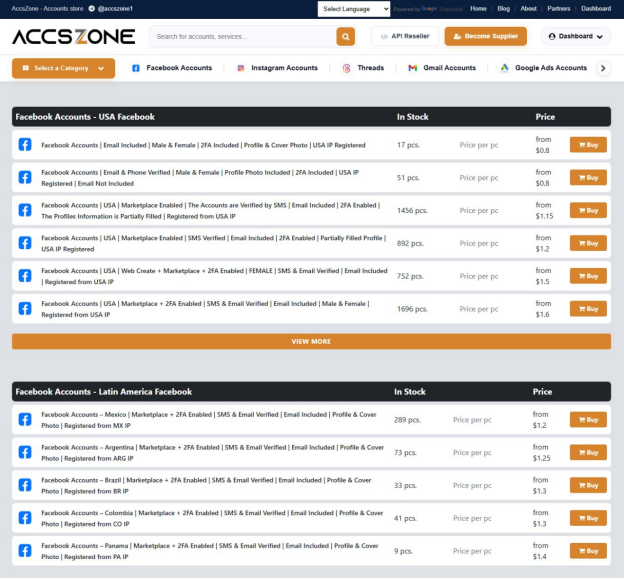
Caption: A quality account provider offers country-specific accounts organized by region — USA, Latin America, Europe, Asia — each created on local residential IPs with SMS verification and complete profile data.
What to look for when sourcing accounts. If you are sourcing accounts from a third-party provider rather than creating them yourself, evaluate providers based on:
Pre-warmed vs. fresh accounts. Some accounts come pre-warmed — they have logged in, browsed, interacted with content, and built a baseline activity history. These are ready for immediate use. Fresh accounts (sometimes called PVA — phone verified accounts) need a warming period of gradual, natural-looking activity before they can handle high-volume operations like ad campaigns or outreach.
Platform-by-Platform Setup Guide
Each platform has unique detection methods and quirks. Here is how to configure your infrastructure for the five major platforms.
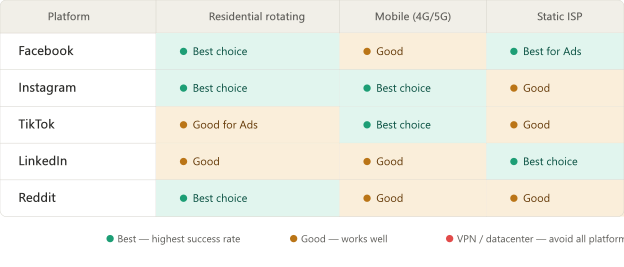
Caption: Recommended proxy type for each social media platform — residential rotating is the versatile default, mobile proxies excel on mobile-first platforms, and static ISP proxies are best for persistent sessions.
Facebook (Including Facebook Ads)
Facebook has the most sophisticated multi-account detection system of any social platform. It correlates IP addresses, browser fingerprints, device IDs, payment methods, and even ad creative similarity across accounts.
Proxy recommendation: Residential rotating proxies with country-level targeting matching the account’s origin country. For ad accounts that maintain long sessions, use sticky sessions (30+ minute session duration) so the IP does not rotate mid-session. For Facebook Ads specifically, some operators prefer static ISP proxies because the fixed IP builds long-term trust with Facebook’s systems.
Account setup workflow:
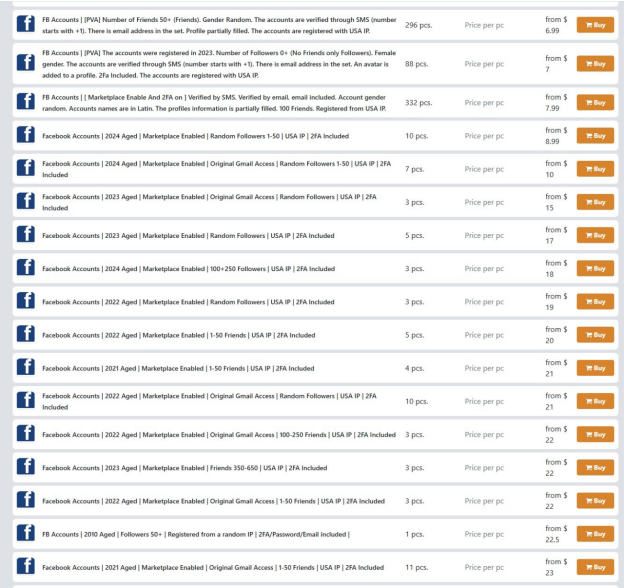
Caption: Aged Facebook accounts with marketplace access, friends, and 2FA — accounts ranging from 2021 to 2024 carry significantly higher platform trust than freshly created ones, making them ideal for advertising and long-term operations.
Critical Facebook-specific rules:
Instagram shares Facebook’s parent infrastructure (Meta), so many of the same detection methods apply. However, Instagram was designed mobile-first, which changes the proxy dynamics.
Proxy recommendation: Rotating residential IPs from the account’s target country. For Instagram specifically, mobile proxies perform exceptionally well because Instagram’s systems are tuned to expect traffic from mobile carrier IPs. If most of your Instagram activity is engagement (likes, comments, follows), mobile proxies reduce challenge rates significantly.
Account setup workflow:
Instagram-specific limits to respect:
TikTok
TikTok’s detection is uniquely device-focused. Beyond IP and browser fingerprinting, TikTok reads device-level identifiers including the device model, operating system build number, and in some markets, SIM card data.
Proxy recommendation: Mobile proxies are the strongest choice for TikTok. The platform was built for mobile devices and trusts mobile carrier IPs more than residential broadband IPs. This is especially important for TikTok accounts used for content posting and creator programs. For TikTok Ads accounts, residential proxies work well since ad management typically happens via the desktop interface.
Account setup workflow:
TikTok-specific considerations:
LinkedIn’s detection is less sophisticated than Facebook’s but is aggressive about automation. LinkedIn monitors connection request velocity, message patterns, and profile viewing behavior. The platform has publicly stated that it prohibits automated tools and will restrict accounts showing automation signatures.
Proxy recommendation: Static ISP proxies are ideal for LinkedIn. LinkedIn accounts maintain persistent sessions and benefit from a consistent IP address that does not change between logins. Unlike social media posting, which can tolerate IP rotation, LinkedIn’s professional context means sessions that appear on a stable, residential connection build more trust.
Account setup workflow:
LinkedIn-specific limits:
Reddit’s detection centers on account karma, age, and activity patterns. New accounts face posting restrictions, karma requirements for certain subreddits, and rate limits on comments.
Proxy recommendation: Residential proxies with rotation. Reddit is less aggressive about IP tracking than Facebook or Instagram, but using the same IP across many Reddit accounts will eventually trigger automated anti-spam systems. Residential proxies provide enough diversity to keep accounts independent.
Account setup workflow:
Reddit-specific considerations:
Common Mistakes That Get Accounts Banned
Based on patterns observed across thousands of multi-account operations, these are the most frequent failures:
Using VPNs or datacenter proxies instead of residential proxies. This is the single most common mistake. VPN IPs are shared, frequently blacklisted, and immediately identifiable by platform detection systems. Datacenter IPs are even more conspicuous — platforms maintain databases of datacenter IP ranges. Residential proxies using real ISP-assigned IP addresses are the minimum viable infrastructure.
Skipping the warmup period. Operators buy accounts and immediately launch ad campaigns at $100/day spend, start sending 50 LinkedIn connection requests, or begin auto-posting to Instagram. Platforms watch for behavior spikes on new (to them) sessions. A gradual ramp-up — low activity for the first 3–5 days, moderate for the next week, full capacity after 2–3 weeks — dramatically improves survival rates.
Sharing proxy IPs between accounts. Every account needs its own dedicated IP. Routing two accounts through the same proxy is the easiest way for platforms to link them. With residential proxy pools exceeding 100 million IPs (like Thordata’s network), there is no reason to share.
Ignoring cookie management. Logging into an account via email and password instead of importing session cookies forces a new-device authentication event. Platforms monitor these events closely. When an account is delivered with cookies, always import and use them before falling back to credential-based login.
Using inconsistent environments. Logging into the same account from different browser profiles, different proxies, or different devices creates conflicting signal data. Once an account is assigned to a browser profile and proxy, keep it there. Consistency is what makes an account look like a real person using their regular computer from their regular home connection.
Not checking accounts before use. Accounts sourced from providers should be validated immediately after delivery — log in via your configured environment and verify the account is in good standing. If an account is already suspended or restricted, a quality provider will replace it instantly. But this only works if you check promptly and within the provider’s replacement window.
Putting It All Together: The Daily Workflow
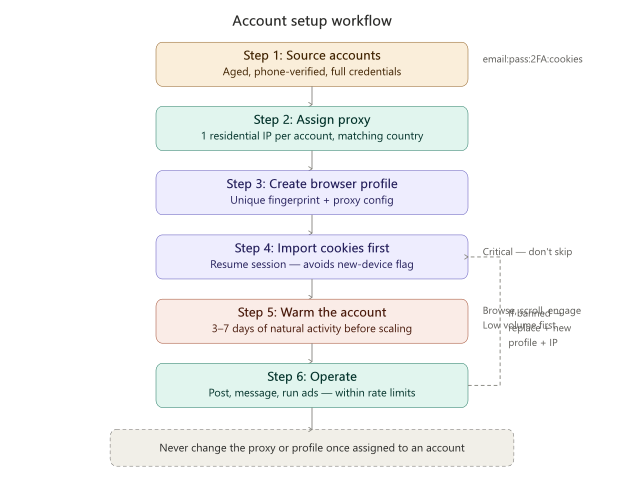
Caption: The six-step account setup workflow — from sourcing to daily operation, with a feedback loop for replacing banned accounts.
A well-organized multi-account operation follows a consistent daily workflow:
Frequently Asked Questions
Can you have multiple Facebook accounts? Facebook’s terms of service allow one personal account per person. However, businesses routinely manage multiple Facebook Pages and ad accounts through Facebook Business Manager. Many marketers maintain separate accounts for separate business entities, each operating from its own infrastructure (unique IP, browser profile, and identity). The key to avoiding detection is ensuring each account appears to Facebook as a completely independent user on a separate device and network.
Can you have multiple Instagram accounts? Instagram officially supports switching between up to five accounts within the app. For operations beyond five accounts, or for accounts that need to appear completely unrelated, each account needs its own isolated environment with a unique proxy and browser fingerprint. Instagram uses the same detection infrastructure as Facebook, so the same rules apply.
Can you have multiple TikTok accounts? TikTok allows users to create multiple accounts, but the platform aggressively links accounts created or accessed from the same device. Each TikTok account should operate from a unique device fingerprint and IP address. Mobile proxies are particularly effective for TikTok because the platform trusts mobile carrier IPs inherently.
What type of proxy is best for social media management? Residential proxies are the standard for multi-account social media management. They use real IP addresses assigned by ISPs, making them indistinguishable from regular users. For mobile-first platforms like TikTok and Instagram, mobile proxies (4G/5G carrier IPs) provide additional trust. For platforms requiring persistent sessions like LinkedIn, static ISP proxies offer a fixed residential IP. Datacenter proxies and VPNs should be avoided — their IP ranges are known to platforms and will trigger immediate challenges or bans.
How many accounts can I manage safely? There is no fixed upper limit. The constraint is infrastructure quality, not quantity. Operators successfully manage hundreds of accounts across platforms, provided each account has its own dedicated proxy, its own browser profile with a unique fingerprint, and sufficient time for warmup and natural-looking activity. The bottleneck is usually operational — managing 100 accounts requires organized workflows, not just technical setup.
How important is account age for multi-accounting? Account age is one of the strongest trust signals across all platforms. Aged accounts — those created months or years ago with some activity history — face fewer verification challenges, have higher platform-internal trust scores, and can handle higher activity volumes from day one. Fresh accounts require longer warmup periods and face stricter rate limits. For operations where time-to-productivity matters, sourcing aged accounts is significantly more efficient than creating and warming new ones.
Do I need a separate proxy for each account? Yes. Sharing a proxy between accounts is the fastest way to get them linked and banned. Each account should have a dedicated IP address from a residential proxy pool. With proxy networks offering tens of millions of IPs across 190+ countries, dedicating one IP per account is both practical and affordable.
What happens if an account gets banned? Isolate the banned account immediately — do not try to access it from the same browser profile or proxy you use for other accounts. Platforms sometimes investigate the environment of a banned account and flag other accounts sharing infrastructure. Replace the banned account, assign it to a fresh browser profile with a new proxy, and continue. This is another reason quality account providers matter — immediate replacement keeps operations running without downtime.
Multi-account management at scale requires coordination between three infrastructure layers: proxy quality, browser isolation, and account trust. No single layer works alone. Residential proxies provide the network identity. Antidetect browsers provide the device identity. Quality accounts provide the platform identity. When all three align, each account appears to every platform as a unique, real user — because at the infrastructure level, it is.
 Looking for
Top-Tier Residential Proxies?您在寻找顶级高质量的住宅代理吗?
Looking for
Top-Tier Residential Proxies?您在寻找顶级高质量的住宅代理吗?
Best Residential Proxy Providers in 2026
Compare 5 residential proxy pr ...
Jenny Avery
2026-06-10
SERP Data Collection in 2026: When to Use a SERP API vs Managing Your Own Proxies
Compare SERP API vs residentia ...
Jenny Avery
2026-06-10

New Trends in Web Data Scraping in 2026: How Does Thordata’s Residential Proxy Solve the Anonymity and Stability Challenges?
When data becomes the oil of the new era, the scraping […]
Unknown
2026-06-10
Residential Proxies for AI Data Collection: A Practical Setup Guide
A practical guide to residenti ...
Jenny Avery
2026-06-10
Thordata Residential Proxy: The Ultimate Guide to AI-Powered Data Collection and Web Scraping Success
I’ll write a comprehensive, SE ...
Xyla Huxley
2026-06-10
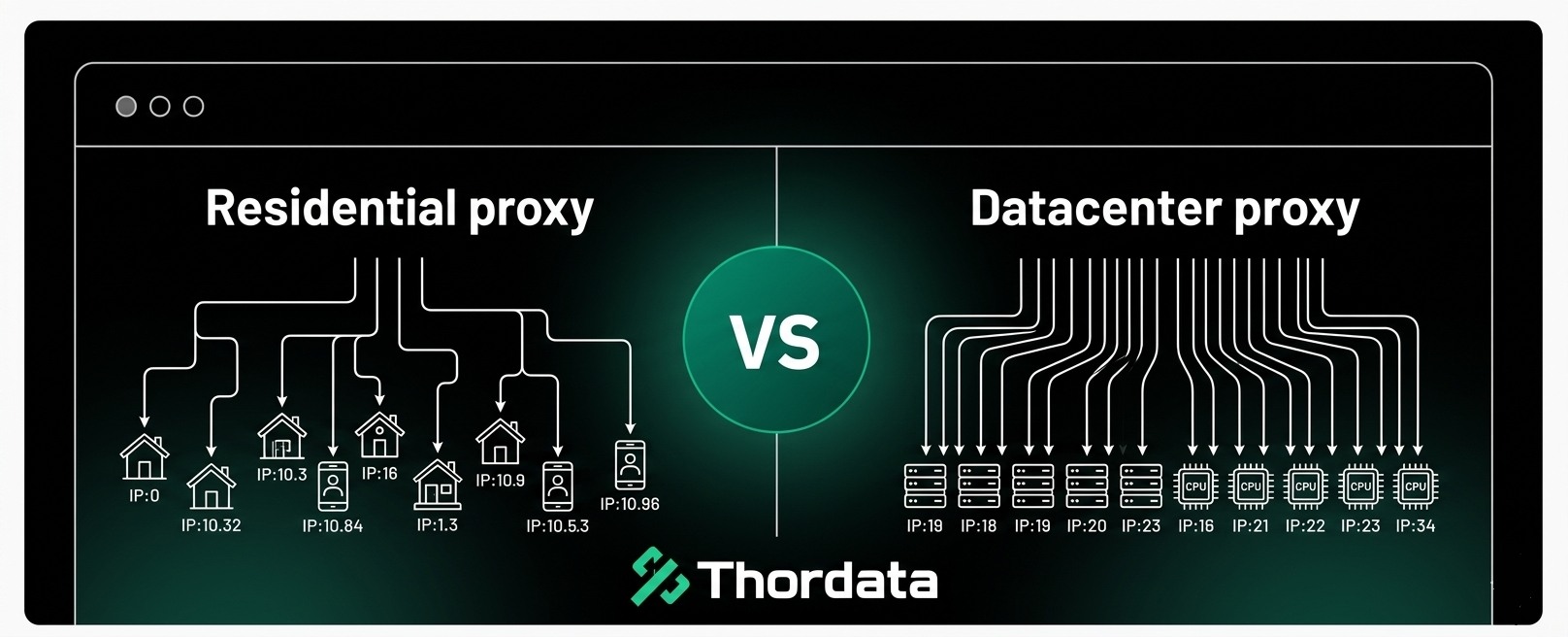
Residential Proxy vs Datacenter Proxy: Which Is the Best Proxy for Web Scraping?
Compare residential proxies an ...
Jenny Avery
2026-06-09
5 Best Fingerprint Browsers for 2026
Fingerprint browsers have beco ...
Xyla Huxley
2026-06-09
Unlimited Residential Proxies: When They Make Sense and How to Choose the Right Plan
Unlimited residential proxies ...
Xyla Huxley
2026-06-08
Residential Proxies for Web Scraping
In this article, we will look ...
Xyla Huxley
2026-06-08